
Software Analysis (Software Analysis क्या है?)
Software Analysis वह process है, जिसमें किसी software system के requirements, structure, logic और behavior को carefully study किया जाता है, जिससे यह समझा जा सके कि software क्या करेगा, कैसे करेगा और क्या वह user की actual Requirements को सही तरह से fulfill कर पाएगा या नहीं।
Key Points
Table of Contents
Toggle- User की सभी requirements को clearly और correctly समझा जाता है।
- Software input कैसे लेगा, process कैसे करेगा और output क्या देगा – इसका detailed analysis किया जाता है।
- Software की Reliability, Performance और Security को बेहतर बनाने में मदद मिलती है।
- Early stage पर mistakes पकड़ में आ जाने से बाद में होने वाला extra cost और rework कम हो जाता है।
What is Software Testing? (Software Testing क्या है?)
Software Testing वह process है, जिसमें software application को run करके यह verify किया जाता है, कि वह सही तरीके से काम कर रहा है, या नहीं, और वह user की requirements के अनुसार correct output दे रहा है, या नहीं।
Key Points
- Software में मौजूद bugs, faults और defects को identify किया जाता है।
- यह verify किया जाता है, कि software सभी user requirements को सही तरीके से fulfill कर रहा है, या नहीं।
- Software की Reliability, Performance और Security को ensure किया जाता है।
- यह confirm किया जाता है, कि developed product वही है, जो user को चाहिए था।
- End user को smooth, reliable और error-free experience मिल सके, यही Testing का मुख्य goal होता है।
Types of Software Analysis and Testing
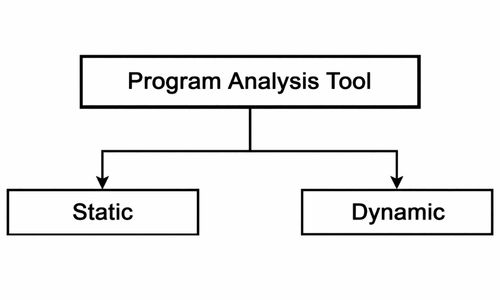
मुख्य रूप से दो types होते हैं :
- Static Analysis
- Dynamic Analysis
1. Static Analysis (Static Testing / Static Code Analysis)
Static Analysis वह technique है, जिसमें software के source code, design documents और program structure को बिना execute (run) किए check किया जाता है, जिससे syntax errors, logical mistakes, coding standard violations और security issues को early stage पर ही identify किया जा सके।
Key Points
- Program को run नहीं किया जाता, केवल code को analyze किया जाता है।
- Development के शुरुआती phase में ही bugs मिल जाते हैं।
- Coding standards, naming conventions और structure सही है या नहीं, यह check होता है।
- Potential vulnerabilities (जैसे buffer overflow, SQL injection risk) detect किए जाते हैं।
- Early stage पर error मिलने से debugging और maintenance cost कम हो जाती है।
Techniques of Static Analysis (Static Analysis की Techniques)
- Code Review : Senior या experienced developer द्वारा program को line-by-line पढ़कर analyze किया जाता है।
इसमें निम्न errors detect किए जाते हैं :- Syntax mistakes
- Logical errors
- Violations of coding standards
- Walkthrough : Developer अपने लिखे हुए code को पूरी team के सामने explain करता है।
Group discussion के माध्यम से:- Errors
- Improvements
- Alternative solutions suggest किए जाते हैं।
- Inspection : यह एक formal technique है। इसमें predefined checklist के आधार पर code और documents को systematically review किया जाता है।
इस process में ये roles शामिल होते हैं:- Author
- Reviewer
- Moderator
- Static Analysis Tools : ये automatic software tools होते हैं जो program को run किए बिना ही code scan करके problems detect करते हैं, जैसे :
- SonarQube
- PMD
- Checkstyle
- FindBugs
Advantages of Static Analysis (Static Analysis के लाभ)
- Early Error Detection : Development के शुरुआती stage में ही bugs और mistakes पकड़ में आ जाते हैं।
- No Execution Needed :Program को run किए बिना ही code की जाँच हो जाती है।
- Improves Code Quality : Coding standards, readability और structure बेहतर होता है।
- Cost Effective : Early stage पर error मिलने से later debugging और maintenance cost कम हो जाती है।
- Security Improvement : Potential security vulnerabilities पहले ही detect हो जाती हैं।
- Better Documentation : Design और requirement documents की quality भी improve होती है।
Limitations of Static Analysis (Static Analysis की सीमाएँ)
- Runtime Errors are not detected : Execution के दौरान आने वाली problems (जैसे memory overflow, performance issues) नहीं मिलतीं।
- No Real User Behavior : User interaction और real environment simulate नहीं होता।
- False Positives : कभी-कभी tools ऐसे issues दिखा देते हैं जो actually problem नहीं होते।
- Requires Skilled Reviewers : Effective analysis के लिए experienced developers की जरूरत होती है।
- Limited Performance Insight : Speed, load handling और response time का सही अनुमान नहीं मिलता।
2. Dynamic Analysis (Dynamic Testing)
Dynamic Analysis वह technique है, जिसमें software को actually run करके उसकी behavior, performance और correctness को check किया जाता है।
Key Points
- Software को run करना जरूरी होता है।
- Runtime errors, crashes, memory leaks और performance issues identify होते हैं।
- Response time, speed, throughput और scalability test की जाती है।
- Hacking attempts और vulnerabilities check की जाती हैं।
- Real-life usage conditions और user interactions simulate किए जाते हैं।
Types of Dynamic Analysis / Testing (प्रकार)
- Functional Testing
- यह verify करता है, कि software user की requirements के अनुसार expected output दे रहा है, या नहीं।
- Performance Testing
- यह measure करता है, कि system कितनी speed, response time और throughput provide कर रहा है।
- Security Testing
- Software की vulnerabilities और potential threats को check करना।
- Stress Testing
- Extreme conditions में software की behavior को analyze करना।
- Regression Testing
- Software में नया feature add होने या bug fix होने के बाद पुराने functionalities ठीक से काम कर रहे हैं, या नहीं check करना।
- Usability Testing
- Software user-friendly और easy-to-use है, या नहीं check करना।
Advantages of Dynamic Analysis (लाभ)
- Real-Time Error Detection : Software run होने पर runtime errors, crashes और memory issues detect होते हैं।
- Performance Evaluation : Software की speed, response time और throughput measure होती है।
- Security Verification : Unauthorized access, hacking attempts और vulnerabilities identify होती हैं।
- User Behavior Simulation : Real-world conditions और user interactions simulate करके software का behavior समझा जाता है।
- Validation of Features : Functional correctness और business logic verify होती है।
Limitations of Dynamic Analysis (सीमाएँ)
- Time-Consuming : Software को run करना, test cases execute करना और results analyze करना बहुत समय ले सकता है।
- Costly : High-end testing tools और test environments expensive हो सकते हैं।
- Environment Dependency : Errors केवल उस environment में detect हो सकते हैं जिसमें test run किया गया है।
- Incomplete Coverage : सभी possible inputs और scenarios test करना मुश्किल होता है।
- Non-Repeatable Errors : कभी-कभी errors हमेशा repeat नहीं होते, इसलिए debugging challenging हो सकती है।
Conclusion (निष्कर्ष)
Static और Dynamic Analysis Software Quality को Next Level तक ले जाते हैं। वे दोनों एक‑दूसरे के पूरक हैं। जब Static Analysis कोड को पहले सुधारता है, तो Dynamic Analysis उस Code को Execute करके सही functionality सुनिश्चित करता है।
इसलिए हर Successful Software Project में दोनों Analysis होना अनिवार्य है।
FAQ (Frequently Asked Questions)
Q1. Static analysis और dynamic analysis में कौन सा ज्यादा important है?
दोनों important हैं। Static analysis early detection के लिए और dynamic analysis runtime errors detect करने के लिए।
Q2. कौन-कौन से tools use किए जाते हैं?
- Static: SonarQube, Checkmarx
- Dynamic: JUnit, Valgrind, JMeter
Q3. क्या dynamic analysis time-consuming है?
हाँ, क्योंकि software को execute करना पड़ता है और runtime errors detect करने पड़ते हैं।
Q4. क्या testing SDLC में late stage में करनी चाहिए?
नहीं, early stage में testing करना cost-effective और error detection efficient होता है।
Q5. Real-world examples कौन से हैं?
IRCTC, Paytm, Flipkart, ISRO, Banking और Healthcare applications।
Q6. क्या static analysis से सभी errors detect हो सकते हैं?
नहीं, runtime और environment-specific errors detect नहीं होते।
Q7. Metrics analysis क्यों important है?
Code complexity, maintainability और testing coverage track करने में मदद करता है।