
SCM क्या है?
Software Configuration Management (SCM) एक systematic process है, जो software के हर version, file और document को track और manage करता है। इसे आप एक digital diary की तरह समझ सकते हैं, जो हर बदलाव को record करती है जिससे ज़रूरत पड़ने पर हम पुराने versions या changes आसानी से देख सकें।
Table of Contents
ToggleSCM का मुख्य purpose है, changes को organize, record और control करना, ताकि development process smooth और error-free रहे। इसे आप ऐसे समझ सकते हैं, जैसे आप अपने smartphone में photos organize करते हैं — albums, dates, names आदि के हिसाब से।
Key Points
- Configuration Item (CI) : कोई भी element जिसे track किया जाता है, जैसे code file, document, test script या design file।
- Baseline : एक stable और verified version जिसे किसी भी stage पर reference के रूप में रखा जाता है।
- Repository : एक central location जहां सभी files stored और managed होते हैं।
- Version Control : हर बदलाव का अलग version बनाना, ताकि पुरानी versions को restore या compare किया जा सके।
Main Components of SCM
(SCM के मुख्य Components)
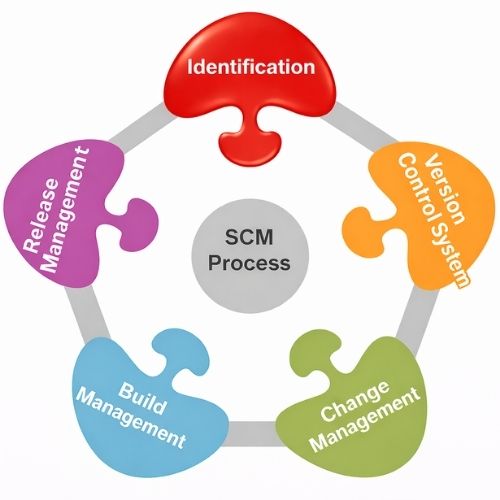
Software Configuration Management (SCM) एक systematic process है, जो software development lifecycle में सभी items, changes और versions को track और manage करता है। इसके चार मुख्य components हैं:
1. Version Control System (VCS)
Version Control System (VCS) वह tool है, जो software के हर version को track करता है। इससे पता चलता है, कि कौन‑सा code कब और किसने change किया।
Importance :
- Multiple developers के conflicts avoid होते हैं
- किसी गलती होने पर previous stable version पर revert किया जा सकता है
- Project की पूरी history maintain होती है
2. Change Management
Change Management ensure करता है कि software में कोई भी change systematically approve और implement किया जाए।
Importance :
- Random changes से bugs बढ़ सकते हैं
- Team coordination आसान होती है
- Changes traceable होते हैं
3. Build Management
Build Management का मतलब है, कि source code को executable software में convert करना।
Importance :
- Automated builds ensure करते हैं, कि software consistent और error-free रहे
- Continuous Integration / Deployment possible होती है
4. Release Management
Release Management ensure करता है, कि correct version of software production या user तक safely पहुँचे।
Importance:
- Wrong version deployment से major failures हो सकते हैं
- Rollback process आसान हो जाता है
- Release cycle controlled और predictable रहता है
Importance of SCM (SCM क्यों ज़रूरी है?)
- Makes team collaboration easier
- Multiple developers एक साथ code पर काम कर सकते हैं
- SCM ensures कि सभी को latest version मिले और कोई भी accidental overwrite न हो
- Tracking bugs and errors is easy
- हर change tracked रहता है
- Old versions को आसानी से revert किया जा सकता है
- Managing multiple versions is possible
- Software के अलग-अलग versions (development, testing, production) maintain किए जा सकते हैं
- Release And Deployment Controlled
- Correct version को user तक safely पहुँचाना guaranteed होता है
- Documentation And Audit Trails
- SCM हर change का detailed record रखता है
- Compliance और auditing आसान होती है
- Increases productivity and efficiency
- Developers को हमेशा latest version मिलता है
- Conflicts कम होते हैं
- Automated builds और deployments possible होते हैं
- Risk Reduction
- Unauthorized या accidental changes से protection मिलती है
- Security issues कम होते हैं
SCM Functionalities (मुख्य कार्य)
1. Identification : SCM यह पहचान करता है कि कौन‑सा Configuration Item (CI) track होगा।
- Configuration Item (CI) : कोई भी element जिसे manage और track किया जाता है
- Importance : यह ensure करता है कि सभी जरूरी components properly documented और controlled हों
2. Control : SCM ensure करता है कि software में केवल authorized changes ही implement हों।
Importance
- Random changes से errors कम होते हैं
- Production environment secure रहता है
3. Status Accounting : SCM हर CI का status और history record करता है।
Importance
- Project transparency बढ़ती है
- Historical reference available रहता है
4. Audit & Review : SCM यह सुनिश्चित करता है कि सभी standards, policies और procedures follow हुए हैं।
Importance
- Quality assurance में मदद करता है
- Unauthorized changes detect होते हैं
- Regulatory compliance maintained रहता है
SCM Process (SCM की प्रक्रिया)
- Planning
- SCM process का पहला step है, planning।
- Decide करना कि कौन‑से Configuration Items (CIs) track होंगे और किस तरह manage होंगे।
- Identification
- हर CI को identify करना और unique ID देना।
- CI में source code, design document, database script, test cases शामिल हो सकते हैं।
- Version Control / Change Management
- हर change का version create करना
- Authorized changes को review और approve करना
- Old versions को rollback के लिए maintain करना
- Configuration Status Accounting
- हर CI का status और history record करना
- कौन‑सी version latest है, कौन‑सा developer क्या change किया, कब किया
- Audit & Review
- SCM process सुनिश्चित करता है कि सभी standards और policies follow हुए हैं
- Unauthorized या faulty changes detect होते हैं
- Build & Release Management
- Build Management
- Source code को executable software में convert करना
- Automated tools जैसे Jenkins, Maven, Gradle use होते हैं
- Release Management
- Correct software version को production या user तक पहुँचाना
- Rollback options maintain करना
- Build Management
Advantages (फायदे)
- Improved Collaboration
- Multiple developers एक साथ काम कर सकते हैं, बिना conflicts के
- Team के सभी members को latest version मिलता है
- Easy Rollback
- अगर कोई code या feature गलत हो जाता है, previous stable version restore किया जा सकता है
- Better Code Quality
- Version control और review process से errors और bugs कम होते हैं
- Code peer review, automated build और testing आसान हो जाते हैं
- Track History & Audit
- हर CI (Configuration Item) का history log maintain होता है
- Compliance और auditing के लिए ready रहता है
- Efficient Release Management
- Correct software version users तक safe तरीके से पहुँचता है
- Rollback और patch updates आसानी से manage होते हैं
- Risk Reduction
- Large scale projects में critical failures avoid होते हैं
SCM Challenges (समस्याएँ)
- Merge Conflicts
- जब multiple developers एक ही file में अलग changes करते हैं, conflict होता है
- Conflict resolution समय और skill demand करता है
- Team Coordination
- Large teams में सबको synchronized रखना चुनौतीपूर्ण होता है।
- Remote या distributed teams में communication gaps और delays बढ़ सकते हैं।
- Security Issues
- Unauthorized access या repository compromise होने का खतरा रहता है।
- strong authentication और access control mechanisms का उपयोग करना आवश्यक है।
- Storage Overhead
- हर version और CI का history maintain करना storage-heavy हो सकता है
- Especially large projects में GBs/TBs of storage लग सकते हैं
- Learning Curve
- Git, SVN, Mercurial जैसे tools initially complex लग सकते हैं
- Proper training और documentation की जरूरत होती है
Conclusion (निष्कर्ष)
Software Configuration Management (SCM) एक essential process है, जो software development lifecycle में changes, versions और documents को systematically track और manage करता है।
SCM के माध्यम से :
- Development process organized और error-free बनती है
- Team collaboration आसान होती है
- Bugs और conflicts कम होते हैं
- Software का historical record और audit trail हमेशा उपलब्ध रहता है
- Correct software versions सुरक्षित तरीके से release होते हैं
- Risk और unauthorized changes से सुरक्षा मिलती है
SCM के बिना large-scale projects में errors, delays और security risks बढ़ जाते हैं। इसलिए यह modern software development का backbone माना जाता है।
Frequently Asked Questions
1. SCM क्या है?
- SCM (Software Configuration Management) एक systematic process है जो software के versions, files और documents को track और control करता है।
2. SCM के मुख्य components कौन‑कौन से हैं?
- Version Control System (VCS)
- Change Management
- Build Management
- Release Management
3. Version Control System का महत्व क्या है?
- VCS हर code change को track करता है, previous versions को restore करता है और multiple developers के बीच conflicts avoid करता है।
4. SCM क्यों ज़रूरी है?
- SCM software development को organized, error-free और secure बनाता है। यह team collaboration, bug tracking, version management और risk reduction में मदद करता है।
5. SCM के फायदे क्या हैं?
- Improved collaboration
- Easy rollback
- Better code quality
- Track history & audit
- Efficient release management
- Risk reduction
6. SCM में कौन‑सी चुनौतियाँ आती हैं?
- Merge conflicts
- Team coordination issues
- Security risks
- Storage overhead
- Learning curve (Git, SVN, Mercurial tools)