

Cache Memory (Cache Memory क्या है?)
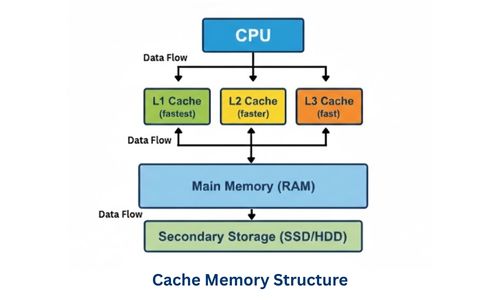
Cache Memory एक high-speed small-sized memory होती है, जो CPU और Main Memory (RAM) के बीच स्थित रहती है। इसका मुख्य कार्य frequently used data और instructions को temporarily store करना है, ताकि CPU उन्हें बहुत तेज़ी से access कर सके।
Table of Contents
Toggleयह CPU की processing speed को बढ़ाने और RAM की slow access speed की समस्या को कम करने में मदद करती है।
Key Points (मुख्य बिंदु)
- Cache Memory CPU के बहुत पास या CPU के अंदर होती है
- यह RAM से तेज़ access speed प्रदान करती है
- frequently used data और instructions store करती है
- CPU waiting time कम करती है
- system performance improve करती है
- size छोटी लेकिन speed बहुत अधिक होती है
- semiconductor technology से बनी होती है
- expensive memory होती है
- CPU और RAM के बीच speed gap को कम करती है
- fast processing और multitasking में मदद करती है
Why is Cache Memory Needed?
Cache Memory की आवश्यकता क्यों है?
Computer system में CPU बहुत तेज़ गति से कार्य करता है, जबकि Main Memory (RAM) की speed comparatively कम होती है। जब CPU को data RAM से लाना पड़ता है, तो उसे wait करना पड़ता है, जिससे processing slow हो जाती है।
इसी speed gap को कम करने और CPU को fast data access देने के लिए Cache Memory की आवश्यकता होती है।
Cache Memory की आवश्यकता (Need of Cache Memory)
- CPU और RAM की Speed Gap कम करना
- CPU बहुत fast होता है
- RAM slow होती है
- Cache बीच में fast access प्रदान करती है
- Fast Data Access प्रदान करना
- frequently used data cache में store रहता है
- CPU को तुरंत data मिल जाता है
- processing तेज़ हो जाती है
- CPU Waiting Time कम करना
- CPU को बार-बार RAM access नहीं करना पड़ता
- idle time कम होता है
- System Performance Improve करना
- applications fast run होती हैं
- system responsive बनता है
- Multitasking को Smooth बनाना
- एक साथ कई programs run करते समय fast data access मिलता है
- system hang होने की संभावना कम होती है
- RAM Access Load कम करना
- बार-बार RAM access की जरूरत नहीं पड़ती
- memory traffic कम होता है
Cache Memory Levels
Modern processors में speed और performance बढ़ाने के लिए Cache Memory को कई स्तरों (levels) में विभाजित किया जाता है। हर level की speed, size और role अलग होता है।
Cache levels का उद्देश्य: CPU को सबसे तेज़ data access देना और memory performance optimize करना।
1. L1 Cache (Level 1 Cache) : L1 Cache सबसे पहली और सबसे fastest cache memory होती है।
Key Features
- CPU के अंदर built-in होती है
- सबसे तेज़ access speed होती है
- size बहुत छोटी (लगभग 16KB – 128KB) होती है
- instructions और data दोनों store करती है
- CPU सीधे access करता है
- इसे Primary Cache भी कहा जाता है।
Types
- Instruction Cache (I-Cache) → instructions store करती है
- Data Cache (D-Cache) → data store करती है
2. L2 Cache (Level 2 Cache) : L2 Cache, L1 से बड़ी लेकिन थोड़ी धीमी cache memory होती है।
Key Features
- CPU chip पर या उसके बहुत पास स्थित होती है
- size लगभग 256KB – 2MB (या अधिक) होता है
- L1 cache का backup की तरह कार्य करती है
- frequently used data store करती है
- जब L1 में data नहीं मिलता (L1 miss), तो CPU पहले L2 को check करता है।
3. L3 Cache (Level 3 Cache) : L3 Cache मुख्यतः multi-core processors में उपयोग होने वाली shared cache होती है।
Key Features
- multiple CPU cores द्वारा shared की जाती है
- size बड़ी लगभग (4MB – 64MB या अधिक) होती है
- speed L1 और L2 से कम होती है
- cores के बीच data sharing को आसान बनाती है
- multitasking और heavy processing में बहुत उपयोगी है
How Cache Levels Work
Cache Levels कैसे काम करते हैं?
Computer system में CPU को जब भी data या instructions की जरूरत होती है, तो वह उन्हें सीधे RAM से नहीं लाता। पहले वह Cache Memory Levels को check करता है, क्योंकि cache RAM की तुलना में बहुत तेज़ होती है।
Cache Working Process (Step-by-Step)
जब CPU को data चाहिए :
- L1 Cache Check
- CPU सबसे पहले L1 Cache में data खोजता है
- यदि data मिल जाता है → इसे Cache Hit कहते हैं
- processing तुरंत शुरू हो जाती है
- L2 Cache Check (अगर L1 में data नहीं मिला)
- CPU L2 cache check करता है
- data मिलने पर L1 में copy किया जाता है
- फिर CPU उसे use करता है
- performance maintain रहती है
- L3 Cache Check (अगर L2 में भी नहीं मिला)
- CPU L3 cache में data खोजता है
- data मिलने पर पहले L2 और फिर L1 में भेजा जाता है
- उसके बाद CPU data को process करता है।
- RAM Access (Last Step)
- अगर data किसी cache level में नहीं मिलता:
- RAM से data fetch होता है
- fetched data cache levels में store कर दिया जाता है।
- CPU फिर उस data को use करता है।
- इसे Cache Miss कहते हैं
Cache Memory Structure (कैश मेमोरी की संरचना)
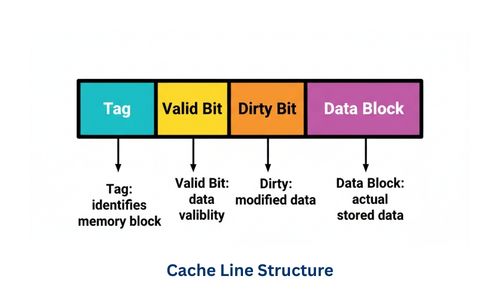
Cache Memory केवल एक छोटी तेज़ memory नहीं है, बल्कि यह एक well-organized structure पर आधारित होती है, जिससे data को तेज़ी से store और retrieve किया जा सके।
Cache memory RAM के data को छोटे-छोटे blocks में store करती है, और special addressing components की मदद से CPU को तुरंत सही data उपलब्ध कराती है।
Cache Memory Structure के मुख्य Components
- Cache Line (Block)
- Tag
- Index
- Data Block
- Valid Bit
- Dirty Bit
1. Cache Line (Cache Block) : Cache Memory data को छोटे blocks में store करती है जिन्हें Cache Lines या Cache Blocks कहा जाता है।
Key Points
- cache storage की basic unit
- प्रत्येक line RAM के एक block को represent करती है
- data transfer block level पर होता है
2. Tag : Tag cache line के साथ जुड़ी information होती है जो बताती है कि यह data RAM के किस address से आया है।
Purpose
- address identification
- सही data locate करने में मदद
3. Index : Index cache memory के specific location को select करने के लिए उपयोग होता है।
Role
- cache में data कहाँ store है यह बताता है
- fast searching में मदद करता है
4. Data Block : यह cache line का मुख्य हिस्सा होता है जिसमें actual data store रहता है।
Key Points
- RAM से लाया गया data store करता है
- CPU इसी data का उपयोग करता है
5. Valid Bit : Valid bit बताता है कि cache line में stored data valid है या नहीं।
Working
- 1 = valid data
- 0 = invalid / empty
6. Dirty Bit (Modified Bit) : Dirty bit यह दर्शाता है, कि cache में stored data RAM से बदल चुका है या नहीं।
Working
- 1 = data modified (RAM update करना बाकी)
- 0 = data unchanged
Cache Structure Working (Step-by-Step)
Cache Memory का structure इस प्रकार design किया जाता है, कि CPU को required data सबसे कम समय में मिल सके। जब CPU किसी memory location से data मांगता है, तो cache structure उसे तेजी से खोजने और प्रदान करने का कार्य करती है। यह पूरा process Index, Tag, Valid Bit और Data Block के सहयोग से होता है।
Step-by-Step Working Process
1. CPU Memory Address भेजता है
- जब CPU को data चाहिए होता है, वह एक memory address generate करता है।
- यह address बताता है कि data कहाँ stored है।
2. Address का विभाजन (Address Breakdown)
- Cache memory उस address को तीन भागों में divide करती है :
- Index → cache line location खोजने के लिए
- Tag → सही block पहचानने के लिए
- Offset → block के अंदर exact data location
- इससे search process तेज़ हो जाती है।
3. Index के माध्यम से Cache Line चयन
- Index field cache memory में एक specific line या set को select करता है।
- CPU सीधे सही location पर पहुंच जाता है।
4. Tag Comparison (Tag Matching)
- अब selected cache line के tag की तुलना CPU द्वारा भेजे गए tag से की जाती है।
- अगर tag match करता है → data सही है
- अगर match नहीं करता → data मौजूद नहीं है
5. Valid Bit Check
- Valid bit check करती है कि cache line में stored data valid है या नहीं।
- 1 = valid data
- 0 = empty / invalid
- यह गलत data access से बचाता है।
6. Cache Hit या Cache Miss Decision
Cache Hit
- यदि :
- tag match हो जाए
- valid bit = 1
- data तुरंत CPU को मिल जाता है।
Cache Miss
- यदि:
- tag match न हो
- valid bit = 0
- data cache में नहीं है।
7. Data RAM से Cache में Load होता है (Miss की स्थिति में)
- Cache miss होने पर :
- RAM से data fetch होता है
- cache line में store किया जाता है
- tag और valid bit update होते हैं
- data CPU को भेजा जाता है
8. Offset का उपयोग
- Offset block के अंदर exact byte या word locate करता है।
- CPU को सही data मिल जाता है।
Cache Mapping Techniques
Cache Memory में Main Memory (RAM) का data किस स्थान पर store होगा, यह Cache Mapping Techniques तय करती हैं। Mapping method यह निर्धारित करती है, कि RAM के blocks cache की lines में कैसे map होंगे और CPU data को कितनी तेजी से खोज पाएगा, जिसे Cache Mapping Technique कहा जाता है।
Why is Cache Mapping Necessary?
(Cache Mapping क्यों आवश्यक है?)
1. Limited Cache Size की समस्या हल करने के लिए
- Cache memory बहुत छोटी होती है
- RAM बहुत बड़ी होती है
- Mapping तय करती है कौन-सा data cache में आएगा
2. Fast Data Retrieval सुनिश्चित करने के लिए
- CPU को data तुरंत मिलना चाहिए
- mapping search process को तेज़ बनाती है
- fast lookup संभव होता है।
3. Memory Conflicts कम करने के लिए
- यदि mapping न हो:
- data गलत जगह store हो सकता है
- बार-बार replacement होगा
- mapping conflicts कम करती है।
4. Cache Hit Ratio बढ़ाने के लिए
- सही mapping से:
- frequently used data cache में रहता है
- cache hit बढ़ता है
- performance improve होती है
5. CPU Waiting Time कम करने के लिए
- यदि data सही स्थान पर store हो:
- CPU तुरंत access कर सकता है
- RAM access कम होता है
- system speed बढ़ती है।
6. Efficient Cache Utilization के लिए
- Mapping techniques cache space का सही उपयोग सुनिश्चित करती हैं।
- unnecessary overwriting कम होता है।
Cache Mapping Techniques के प्रकार
Cache mapping की तीन मुख्य techniques होती हैं :
- Direct Mapping
- Fully Associative Mapping
- Set Associative Mapping
1. Direct Mapping (डायरेक्ट मैपिंग)
Direct Mapping एक सरल और basic cache mapping technique है, जिसमें Main Memory (RAM) का हर block cache में एक fixed location पर ही store होता है।
मतलब, प्रत्येक memory block का cache में predetermined slot होता है।
Key Points (मुख्य बिंदु)
- सबसे सरल और low-cost cache mapping technique है
- Memory block केवल एक specific cache line में ही जा सकता है
- Fast access time (simple hardware design) होता है
- Hardware implementation आसान है
- Conflict misses अधिक होते हैं
- Cache utilization moderate होती है
- Mostly basic/low-end systems में उपयोगी है
Example (उदाहरण)
- मान लीजिए :
- Cache में 8 lines हैं (0–7)
- RAM में Memory Block 10 है
Step : Cache line select करें
- 10 Mod 8 = 2
Memory Block 10 हमेशा Cache Line 2 में जाएगा।
- अगर line 2 पहले से occupied है → old block replace होगा
- new block store होगा
2. Fully Associative Mapping (फुली एसोसिएटिव मैपिंग)
Fully Associative Mapping वह cache mapping technique है, जिसमें Main Memory (RAM) का कोई भी block cache के किसी भी line में store किया जा सकता है।
मतलब, किसी block का cache में कोई fixed position नहीं होती। यह सबसे flexible mapping technique है।
Key Points (मुख्य बिंदु)
- Cache में कोई भी RAM block किसी भी line में store हो सकता है
- Highest flexibility और best cache utilization प्रदान करता है
- Conflict misses बहुत कम होते हैं
- Hardware complex और costly होता है
- Searching के लिए tag comparison जरूरी होता है
- Access speed Direct Mapping की तुलना में थोड़ी धीमी होती है
- High-performance computing और modern systems में उपयोग किया जाता है
Example (उदाहरण)
मान लीजिए :
- Cache में 4 lines हैं
- RAM के Memory Block 10, 22, 35 को load करना है
- Memory Block 10 → Cache Line 1
- Memory Block 22 → Cache Line 3
- Memory Block 35 → Cache Line 0
- Block किसी भी empty line में store हो सकता है
- कोई fixed mapping नहीं होती
3. Set Associative Mapping (सेट एसोसिएटिव मैपिंग)
Set Associative Mapping cache mapping का hybrid technique है, जो Direct Mapping और Fully Associative Mapping दोनों का Combination है। इसमें Cache को कई sets में divide किया जाता है, और RAM का हर block केवल specific set में store होता है, लेकिन उस set के किसी भी line में placement flexible होती है।
Key Points (मुख्य बिंदु)
- Cache को कई sets में divide किया जाता है
- RAM block केवल specific set में map होता है
- Set के अंदर किसी भी line में store किया जा सकता है
- Conflict misses कम होते हैं
- Cache utilization बेहतर होती है
- Hardware complexity moderate होती है
- Modern CPUs में widely use technique है
Example (उदाहरण)
मान लीजिए :
- Cache → 8 lines, 4 sets (Set 0, 1, 2, 3), 2 lines per set
- RAM के कुछ blocks हैं: 10, 22, 35, 47
- RAM Block 10 → Set 2 (Block 10 % 4 = 2)
- Set 2 में किसी भी line में store हो सकता है
- अब Set 2 full हो गया है (Block 10)
- replacement policy (LRU/FIFO) लागू होगी
Replacement Algorithms (कैश रिप्लेसमेंट एल्गोरिदम)
Replacement Algorithm वह तरीका है, जो यह निर्धारित करता है, कि जब Cache Memory full हो, और CPU को नया data load करना हो, तो कौन सा पुराना cache block हटाया जाए।
Key Points (मुख्य बिंदु)
- Cache full होने पर old data को replace करने के लिए जरुरी है
- Efficient cache utilization सुनिश्चित करता है,
- CPU waiting time कम करता है
- Cache hit ratio को बढ़ाने में मदद करता है
- Hardware और software दोनों implement किया जा सकता है
- Popular algorithms : LRU, FIFO, Random, LFU
- Modern CPUs में mostly LRU या Set Associative और LRU use होता है
- Replacement policy directly system performance प्रभावित करती है
Importance of Replacement Algorithms
1. Efficient Cache Utilization
- Cache size limited होती है
- Replacement algorithm ensure करता है, कि cache में सबसे जरूरी और frequently used data रखा जाए
- Unnecessary data overwrite कम होता है
2. High Cache Hit Ratio
- सही algorithm use करने से cache hit ratio बढ़ता है
- CPU को अधिक बार data cache से मिल जाता है
- RAM access time काम होता है, fast processing होती है
3. Reduces CPU Waiting Time
- अगर cache hit अधिक → CPU तुरंत data access करता है
- Waiting time कम होता है, system fast और responsive बनता है
4. Improves System Performance
- CPU और memory interaction optimized होती है
- High-speed applications smoothly run होती हैं (जैसे gaming, AI, multimedia)
5. Reduces Memory Conflicts
- Cache full होने पर पुराने data intelligently replace होते हैं
- Conflicts और unnecessary replacement कम होता है
6. Supports Efficient Multi-tasking
- Modern OS में कई programs simultaneously run होते हैं
- Replacement algorithms ensure करते हैं कि frequently used blocks हमेशा cache में रहें
- Applications hang या slow न हों
Common Replacement Algorithms
1. LRU (Least Recently Used)
LRU (Least Recently Used) एक cache replacement algorithm है, जिसमें cache full होने पर वह block replace किया जाता है जो सबसे लंबे समय से use नहीं हुआ।
Key Points (मुख्य बिंदु)
- Modern CPUs में सबसे popular replacement algorithm है
- Cache full होने पर least recently used (LRU) block replace किया जाता है
- Hardware या software दोनों तरीके से implement किया जा सकता है
- FIFO से थोड़ी complex, लेकिन performance बेहतर होती है
- Mostly set-associative या fully-associative caches में use होता है
Example (उदाहरण)
- मान लीजिए :
- Cache Lines : [A, B, C]
- CPU Access Sequence : A → B → C → A → D
Step-by-Step:
- Initial cache : [A, B, C]
- CPU needs D, cache full
- LRU determines least recently used → B and C (last used long time ago)
- Replace B with D → Cache now : [A, D, C]
2. FIFO (First In First Out)
FIFO (First In First Out) एक cache replacement algorithm है, जिसमें cache full होने पर सबसे पहले आया block सबसे पहले replace होता है।
Key Points (मुख्य बिंदु)
- Simple और easy to implement process है
- Hardware cost कम होती है
- Cache full होने पर oldest block replace होता है
- Hit ratio LRU से कम, लेकिन implementation सरल है
- Mostly low-cost systems और basic caches में use होता है
- Queue data structure के concept पर based है
Example (उदाहरण)
- मान लीजिए :
- Cache Lines : [A, B, C]
- CPU Access Sequence : A → B → C → D
Step-by-Step:
- Cache initially empty → CPU accesses A
- Cache : [A]
- CPU → B
- Cache : [A, B]
- CPU → C
- Cache : [A, B, C] → Cache full
- CPU → D → Replacement needed
- Oldest block = A
- Replace A with D → Cache : [D, B, C]
3. Random Replacement
Random Replacement एक cache replacement algorithm है, जिसमें cache full होने पर कोई भी block randomly select होकर replace किया जाता है।
Key Points (मुख्य बिंदु)
- Cache full होने पर कोई भी block randomly replace होता है
- Simple hardware implementation है
- Fast decision-making, low overhead
- Hit ratio unpredictable होते है
- Mostly low-cost or simple cache systems में उपयोह होता है
- Usage या order tracking की कोई आवश्यकता नहीं होती
Example (उदाहरण)
- मान लीजिए :
- Cache Lines : [A, B, C]
- CPU Access Sequence : D
Step-by-Step:
- Cache full : [A, B, C]
- Random Replacement → randomly select line B
- Replace B with D → Cache now : [A, D, C]
- Next replacement के लिए फिर कोई random line select होगी
- Hit ratio unpredictable है
Cache Performance Metrics
1. Hit Ratio (Cache Hit Ratio) : Hit Ratio वह fraction है, जो यह बताता है, कि CPU द्वारा requested data cache में पहले से मौजूद था।
Hit Ratio = Number of Cache Hits / Total Memory Accesses
- High Hit Ratio → Good performance
- CPU को RAM access कम करनी पड़ती है
Example :
- Total Accesses = 100
- Cache Hits = 80
- Hit Ratio = 80 / 100 = 0.8 → 80%
2. Miss Ratio (Cache Miss Ratio) : Miss Ratio वह fraction है जो यह बताता है कि CPU द्वारा requested data cache में नहीं था।
Miss Ratio = [1 – Hit Ratio] = [Cache Misses / Total Accesses]
- Low Miss Ratio → Better performance
Example :
- Hit Ratio = 80%
- Miss Ratio = 1 – 0.8 = 0.2 → 20%
3. Hit Time : Hit Time वह समय है, जो CPU को cache में data access करने में लगता है।
- Includes : Tag check + data read time
- Generally, very fast → nanoseconds
4. Miss Penalty : Miss Penalty वह extra समय है जो CPU को RAM से data fetch करने में लगता है, जब cache miss होता है।
- Includes : Time to access RAM + transfer to cache
- Usually much higher than hit time → slows down CPU
Example :
- Cache Hit Time = 2 ns
- RAM access = 100 ns
- Miss Penalty = 100 ns
5. Average Memory Access Time (AMAT) : AMAT वह average time है जो CPU को memory access में लगता है।
Example :
- Hit Time = 2 ns
- Miss Ratio = 0.2
- Miss Penalty = 100 ns
- AMAT=2+(0.2×100)=2+20=22
- AMAT=2+(0.2×100)=2+20=22
- Lower AMAT → better cache performance
Real-Life Applications of Cache Memory
1. CPU Performance Boost
- CPU के लिए frequently used instructions और data cache में store रहते हैं।
- इससे processing fast होती है, और high-performance tasks जैसे gaming, video editing, AI processing smooth चलती हैं।
2. Web Browsing and Internet Speed
- Browser cache frequently accessed web pages और images store करता है।
- इससे internet experience fast और smooth बनता है।
- Example : Google Chrome, Firefox
3. E-Commerce Applications
- Online shopping websites frequently accessed product info, images और user preferences cache करती हैं।
- इससे website fast load होती है और user experience बेहतर होता है।
- Example: Flipkart, Amazon, Paytm
4. Database Systems
- Frequently queried data cache में store होती है → query execution fast होती है।
- Disk I/O कम होता है और performance बढ़ती है।
- Example : Banking systems, ERP systems, IRCTC ticket booking
5. Multimedia Applications
- Audio/video streaming apps recently played data cache करती हैं।
- Playback smooth होता है, buffering कम होती है।
- Example : YouTube, Netflix, Spotify
- Mobile apps locally video chunks cache करती हैं।
6. Graphics Processing
- GPU frequently used textures, shaders और graphics data cache करता है।
- High-end gaming और rendering smooth होती हैं।
- Example : NVIDIA, AMD GPUs → Texture cache
7. Operating System Optimization
- OS kernel frequently used instructions cache में रखता है।
- इससे process scheduling और multitasking efficient होती हैं।
- Example: Windows, Linux, Android
Advantages (लाभ)
- High-Speed Data Access
- Frequently used data cache में store होती है, CPU तुरंत access कर सकता है
- Processing speed बढ़ती है
- Improved System Performance
- Applications और programs smoothly run होते हैं
- Efficient Memory Utilization
- Frequently used blocks cache में रहते हैं, RAM access Time कम होता है
- System resources efficiently use होते हैं
- Supports Multi-tasking
- Multiple programs simultaneously run कर सकते हैं
- OS scheduling fast और responsive रहती है
Disadvantages (हानियाँ)
- Limited Size
- Cache memory बहुत छोटी होती है
- पूरे RAM data को store नहीं कर सकती
- High Cost
- Cache memory high-speed होती है
- Mostly SRAM (Static RAM) use होती है
- Complex Hardware
- Fully associative या set associative cache में hardware design complex है
- Replacement algorithms और tag comparison जरूरी है
- Data Volatility
- Cache volatile होती है, power off होते ही data lost हो जाता है
- Conflict Misses
- Direct mapping cache में same line repeatedly replace हो सकती है, conflict misses होते है
Conclusion (निष्कर्ष)
Cache Memory एक high-speed, small-sized memory है जो CPU और RAM के बीच स्थित होती है। इसका मुख्य उद्देश्य frequently used data और instructions को temporarily store कर CPU को तेज़ data access देना है। यह CPU और RAM की speed gap को कम करती है, CPU waiting time घटाती है और system performance बढ़ाती है। Modern processors में Cache L1, L2 और L3 levels में organized होती है। Cache mapping और replacement algorithms (LRU, FIFO, Random) इसकी efficiency और hit ratio बढ़ाते हैं। इससे multitasking smooth, gaming और multimedia fast, और overall system responsive बनता है।
Cache Memory FAQ
Q1. Cache Memory क्या है?
- Cache Memory एक high-speed, small-sized memory है जो CPU और RAM के बीच स्थित होती है। इसका मुख्य उद्देश्य frequently used data और instructions को temporarily store कर CPU को तेज़ data access देना है।
Q2. Cache Memory क्यों जरूरी है?
- CPU बहुत fast होता है जबकि RAM comparatively slow है। Cache Memory speed gap कम करती है, CPU waiting time घटाती है और system performance बढ़ाती है।
Q3. Cache Memory के कितने levels होते हैं?
Modern processors में मुख्य रूप से 3 levels होते हैं:
- L1 Cache – CPU के अंदर, सबसे fast और smallest
- L2 Cache – L1 के पास, larger और slightly slower
- L3 Cache – multi-core processors में shared cache, largest और slowest
Q4. Cache Hit और Cache Miss क्या हैं?
- Cache Hit: जब CPU द्वारा requested data cache में मौजूद होता है।
- Cache Miss: जब CPU को data cache में नहीं मिलता और RAM से fetch करना पड़ता है।
Q5. Cache Mapping Techniques कौन-कौन सी हैं?
तीन मुख्य techniques हैं:
- Direct Mapping – RAM block एक fixed cache line में store होता है
- Fully Associative Mapping – RAM block किसी भी cache line में store हो सकता है
- Set Associative Mapping – hybrid, RAM block किसी specific set में, किसी भी line में store हो सकता है
Q6. Replacement Algorithm क्या करता है?
- जब cache full हो और नया data load करना हो, replacement algorithm decide करता है कि कौन सा old block हटाया जाए, ताकि cache efficiently use हो और CPU fast data access करे।
Q7. Popular Replacement Algorithms कौन-कौन से हैं?
- LRU (Least Recently Used) – सबसे लंबे समय से unused block replace होता है
- FIFO (First In First Out) – सबसे पहले आया block replace होता है
- Random Replacement – कोई भी block randomly replace होता है