

Direct Memory Access (DMA क्या है?)
Direct Memory Access (DMA) एक hardware-based data transfer technique है, जिसके माध्यम से Input/Output (I/O) devices सीधे Main Memory (RAM) के साथ data transfer कर सकते हैं, बिना CPU की continuous involvement के।
Table of Contents
Toggleसामान्य data transfer में CPU हर byte को read और write करता है, जिससे CPU busy हो जाता है। और system slow हो सकता है। लेकिन DMA का उपयोग होने पर CPU केवल transfer की शुरुआत (initial setup) और transfer पूरा होने पर interrupt handling को handle करता है।, जबकि actual data transfer DMA controller द्वारा किया जाता है।
Key Points (मुख्य बिंदु)
- DMA एक hardware mechanism है, जो high-speed data transfer के लिए उपयोग होता है।
- यह I/O devices और Main Memory के बीच direct communication स्थापित करता है।
- CPU केवल transfer की initial setup और completion interrupt को handle करता है।
- DMA controller transfer process को manage और control करता है।
- Large data transfer (जैसे disk files, video, audio) के लिए DMA सबसे efficient तरीका है।
- CPU load कम होता है, जिससे system performance बेहतर होती है।
- Multitasking और high-speed operations में DMA महत्वपूर्ण भूमिका निभाता है।
- Modern computers में DMA का उपयोग hard disk, graphics card, sound card और network devices में होता है।
Why is DMA Needed? (DMA की आवश्यकता क्यों होती है?)
Computer system में data transfer एक basic और continuous process है। CPU, Memory और I/O devices के बीच information का आदान-प्रदान लगातार होता रहता है। यदि CPU हर byte को manually read और write करे, तो system की speed कम हो जाएगी। इसी समस्या को हल करने के लिए Direct Memory Access (DMA) का उपयोग किया जाता है।
- Reduce CPU Load
- Traditional data transfer में CPU हर byte को handle करता है।, जिससे CPU busy हो जाता है।
- DMA में CPU केवल transfer setup और completion interrupt के लिए involved होता है।
- इससे CPU अन्य tasks जैसे calculations और program execution efficiently कर सकता है।
- High-Speed Data Transfer
- Large data blocks जैसे video, audio, या disk files को DMA fast transfer करता है।
- CPU द्वारा byte-by-byte transfer slow होता है, जबकि DMA multi-byte या block transfer करता है।
- Efficient Multitasking
- DMA के दौरान CPU free रहता है।
- Background programs और system processes uninterrupted चलते रहते हैं।
- Multitasking performance बेहतर हो जाती है।
- Large Data Handling
- Hard disk, graphics cards और network devices high-volume data generate करते हैं।
- DMA इन devices के बड़े data को efficiently handle करता है।
- Real-time systems में smooth data flow बनाए रखता है।
- Improving System Performance
- CPU को बार-बार interrupts handle नहीं करने पड़ते।
- Processing delay कम होता है।
- Overall system fast, responsive और efficient बनता है।
Working of Direct Memory Access
(DMA कैसे काम करता है?)
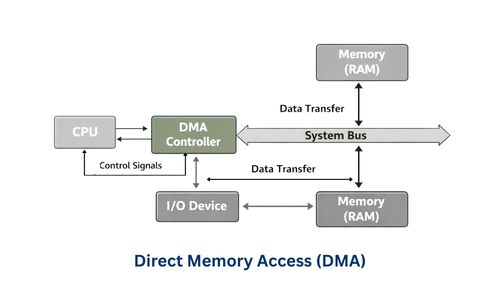
Direct Memory Access (DMA) एक ऐसी technique है, जिसमें I/O devices सीधे Memory के साथ communicate करते हैं, और CPU केवल initial setup और final confirmation में involved होता है। इससे large data transfer fast और efficient हो जाता है।
Step-by-Step Working
Step 1: CPU DMA Controller को Setup करता है
- CPU decide करता है :
- Source Address – (जहाँ से data आएगा)
- Destination Address – (जहाँ data जाएगा)
- Data Size – (कितना data transfer होगा)
- Transfer Mode – (Burst, Cycle Stealing, या Transparent)
Step 2: DMA Controller Bus Control लेता है
- DMA controller system bus का control request करता है।
- CPU bus को temporarily release कर देता है।
- Bus control मिलने के बाद DMA controller transfer शुरू करता है।
Step 3: Data Transfer Process
- DMA controller memory और I/O device के बीच data directly transfer करता है।
- Transfer byte-by-byte या block form में हो सकता है।
- इस दौरान CPU अन्य instructions execute करता रहता है।
Step 4: Transfer Completion Notification
- जब data transfer complete हो जाता है, DMA controller CPU को interrupt signal भेजता है।
- CPU transfer complete होने का confirmation लेता है और अगले tasks execute करता है।
What is DMA Controller? (DMA Controller क्या होता है?)
DMA Controller एक special hardware component या chip/module है, जो Direct Memory Access (DMA) process को manage करता है।
यह CPU की मदद से I/O device और Memory के बीच high-speed data transfer सुनिश्चित करता है।
Key Points (मुख्य बिंदु)
- DMA Controller एक dedicated hardware unit है।
- यह CPU की जगह data transfer को manage करता है।
- CPU केवल transfer setup और completion interrupt handle करता है।
- High-speed data transfer को संभव बनाता है।
- Transfer के दौरान system bus का control संभालता है।
- Transfer complete होने पर CPU को interrupt भेजता है।
- Modern computer systems में performance optimization के लिए आवश्यक component है।
Importance of DMA Controller
(DMA Controller का महत्व)
- CPU Workload कम करता है
- Traditional transfer में CPU हर byte handle करता है।
- DMA controller data transfer संभाल लेता है।
- CPU अन्य tasks (processing, calculations) पर ध्यान दे सकता है।
- High-Speed Data Transfer संभव बनाता है
- Large files जैसे video, images, software data तेजी से transfer होते हैं।
- Block transfer के कारण speed बढ़ती है।
- Disk और memory के बीच fast communication होता है।
- Multitasking Performance सुधारता है
- CPU free रहता है।
- Background applications smoothly चलती हैं।
- System hang या slow नहीं होता।
- System Bus Efficiency बढ़ाता है
- DMA controller bus control लेकर direct transfer करता है।
- CPU और devices के बीच unnecessary delays कम होते हैं।
- Bus utilization optimized होता है।
- Interrupt Overhead कम करता है
- Traditional I/O में CPU को बार-बार interrupt मिलता है।
- DMA में interrupt केवल transfer complete होने पर आता है।
Functions of DMA Controller
(DMA Controller के मुख्य कार्य)
- Generating Memory Addresses
- Source और destination memory addresses provide करता है।
- Data transfer के लिए सही location identify करता है।
- Controlling Data Transfer
- Memory और I/O device के बीच direct data transfer manage करता है।
- CPU को continuous involvement से बचाता है।
- Tracking Transfer Count
- कितनी bytes transfer हो चुकी हैं, और कितनी बाकी हैं, यह track करता है।
- Sending an Interrupt Signal
- Data transfer complete होने पर CPU को notify करता है।
- Managing Bus Control
- System bus पर data transfer के लिए control लेता और release करता है।
Internal Registers of DMA Controller
Register | Function |
Address Register | Memory address store करता है (source/destination) |
Count Register | Transfer के remaining bytes track करता है |
Control Register | Transfer mode और direction define करता है |
Status Register | Transfer status और error conditions दिखाता है |
DMA Data Transfer Modes
- Burst Mode (Block Transfer Mode)
- इस mode में DMA controller पूरा data block एक ही बार में transfer करता है।
- CPU temporarily bus relinquish करता है, मतलब CPU इस दौरान data transfer में involved नहीं होता।
- सबसे fastest DMA mode माना जाता है।
- Cycle Stealing Mode
- DMA controller bus cycle को थोड़े-थोड़े समय के लिए लेता है, इसलिए CPU और DMA दोनों साथ-साथ काम कर सकते हैं।
- CPU slow नहीं होता, लेकिन data transfer speed burst mode से थोड़ी कम होती है।
- Transparent Mode
- DMA तब transfer करता है जब CPU bus का use नहीं कर रहा होता।
- CPU performance unaffected रहती है।
- Speed slow होती है, क्योंकि DMA केवल CPU idle time में transfer करता है।
Applications of DMA (DMA के उपयोग)
Application | Explanation |
Hard Disk Data Transfer | Large files जैसे movies, software programs को RAM में fast transfer करना। |
Audio & Video Streaming | YouTube, Hotstar, Online lectures जैसे continuous media data को smooth playback के लिए transfer करना। |
Graphics Cards (GPU) | Video editing, Gaming, 3D rendering के लिए textures और frame buffers memory ↔ GPU में transfer करना। |
Network Cards | High-speed internet data, online gaming, video conferencing, UPI transactions (Paytm/PhonePe) transfer करना। |
Printers | Large print jobs memory से printer buffer में efficiently transfer करना। |
Advantages of DMA (DMA के लाभ)
- High-Speed Data Transfer
- Large data blocks जैसे video, audio, या disk files fast transfer होते हैं।
- Reduces CPU Load
- CPU केवल transfer setup और completion interrupt handle करता है।
- CPU अन्य processing tasks जैसे calculations और program execution efficiently perform कर सकता है।
- Efficient Multitasking
- CPU free रहता है, जिससे background programs smoothly run हो सकते हैं।
- Improving System Performance
- Overall system fast, responsive और efficient रहता है।
- Ideal for Large Data Handling
- High-volume data transfer जैसे network packets, printing jobs, video streaming efficiently handle होते हैं।
- Fewer CPU Interrupts
- Traditional I/O में CPU हर byte पर interrupt handle करता है।
- DMA में interrupt केवल transfer completion पर आता है।
Disadvantages of DMA (DMA के नुकसान)
- Hardware Complexity
- DMA controller design और implementation complex होता है।
- Bus Priority Issues (Bus Conflict)
- CPU और DMA दोनों bus पर compete कर सकते हैं, conflicts हो सकते हैं।
- Cost Increase (Additional Hardware Cost)
- Extra hardware जैसे DMA controller की वजह से system cost बढ़ जाती है।
- Debugging and Troubleshooting are difficult
- Data transfer errors का पता लगाना या fix करना complex हो सकता है।
- Limited Channels
- Old PCs में DMA channels limited होते थे, multiple devices handle करना कठिन होता है।
DMA vs CPU Controlled Transfer
Feature | CPU Controlled Transfer | DMA Transfer |
CPU Involvement | High – CPU हर byte read/write करता है। CPU पूरी transfer process को control करता है। | Low – CPU केवल transfer start और end handle करता है। DMA controller बाकी काम करता है। |
Speed | Slow – हर byte individually transfer होता है, इसलिए large data slow होता है। | High – Direct memory ↔ I/O device transfer होता है। Large files, video/audio fast। |
Efficiency | Low – CPU busy → system resources inefficient। | High – CPU free रहता है, multitasking efficient। |
Multitasking | Poor – CPU transfer में busy → background programs slow। | Better – CPU free → background tasks और applications smoothly run। |
Best Use | Small data transfer, simple I/O operations, keyboard/mouse input। | Large data transfer, high-speed I/O like hard disk, printer jobs, video/audio streaming, network transfers। |
Interrupts | Frequent – हर byte या small chunk के लिए interrupt। | Minimal – केवल transfer completion पर interrupt। |
Hardware Complexity | Low – सिर्फ CPU और basic I/O controller। | Moderate to High – Requires DMA controller chip/module, bus control और registers। |
Data Transfer Modes | Single mode – byte-by-byte transfer। | Multiple modes – Burst, Cycle Stealing, Transparent mode। |
Bus Control | CPU हमेशा bus hold करता है। | DMA controller temporarily bus control लेता है। |
CPU Utilization | High – CPU mostly busy in transfer। | Low – CPU busy नहीं, other tasks execute करता है। |
Memory Access | Sequential, slow memory access। | Direct, block/multi-byte memory access possible। |
Real-Life Example | Text file copy, keyboard input, simple printer jobs। | Video streaming (YouTube), Hard disk large file copy, Network packet transfer, Printer large jobs। |
System Performance | Overall slow for large data. | Fast, responsive, high throughput for large data. |
Conclusion (निष्कर्ष)
- Direct Memory Access (DMA) एक powerful hardware-based technique है, जो I/O devices और Main Memory के बीच data का direct transfer संभव बनाती है, बिना CPU को लगातार involve किए।
- DMA का मुख्य उद्देश्य CPU load कम करना, high-speed data transfer उपलब्ध कराना और system performance को बेहतर बनाना है।
- जहाँ traditional transfer में CPU हर byte को handle करता है, वहीं DMA controller transfer process को manage करता है और CPU को अन्य tasks perform करने के लिए free रखता है।
- आज के modern computer systems में DMA अत्यंत आवश्यक है, विशेषकर high-speed devices जैसे hard disk, graphics cards, network devices और multimedia applications के लिए।
अक्सर पूछे जाने वाले प्रश्न (FAQ)
1. DMA क्या है?
- Direct Memory Access (DMA) एक hardware-based data transfer technique है, जो I/O devices और memory के बीच direct data transfer करती है बिना CPU को हर byte handle करवाए।
2. DMA की आवश्यकता क्यों होती है?
- CPU पर load कम करने, high-speed data transfer और system performance बढ़ाने के लिए DMA जरूरी है।
3. CPU की DMA में क्या भूमिका है?
- CPU केवल transfer setup करता है, और completion interrupt handle करता है। Actual data transfer DMA controller द्वारा किया जाता है।
4. DMA Controller क्या करता है?
- Memory addresses generate करना
- Data transfer को control करना
- Transfer count track करना
- Transfer complete होने पर CPU को interrupt भेजना
5. DMA के मुख्य लाभ क्या हैं?
- High-speed data transfer
- CPU load कम होना
- Efficient multitasking
- Overall system performance improve होना
6. DMA कहाँ उपयोग होता है?
- Hard disk, graphics card, sound card, network devices, printer और multimedia applications में high-speed data transfer के लिए।