

Software Test Process (सॉफ्टवेयर टेस्ट प्रोसेस)
Software Testing कोई random activity नहीं है। इसे एक structured process के रूप में follow किया जाता है, जिससे software की quality और reliability ensure हो सके।
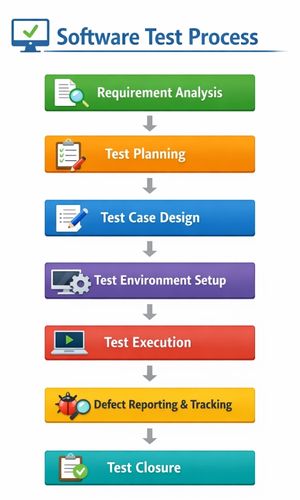
Software Test Process में मुख्य रूप से 6 stages होती हैं, जो sequential या iterative approach में follow की जाती हैं।
Table of Contents
Toggle1. Requirement Analysis
- सबसे पहला step है, requirements को समझना और analyze करना।
- Developers और Testers मिलकर SRS (Software Requirement Specification) को study करते हैं।
- यह check किया जाता है, कि requirements testable हैं, या नहीं।
2. Test Planning
- Test Planning phase में testing strategy और approach decide की जाती है।
- कौन-कौन से tools, techniques और resources use होंगे, यह Decide होता है।
- Important documents : Test Plan Document, Test Schedule, Resource Plan
3. Test Case Development
- Testers हर requirement के लिए detailed Test Cases लिखते हैं।
- Test Case में शामिल होते हैं : Input, Expected Output, Test Steps, Precondition, Postcondition
4. Test Environment Setup
- यह physical या virtual environment होता है, जहाँ software को test किया जाता है।
- Tools जैसे Selenium, JIRA, Jenkins, Postman (API testing) यहाँ setup होते हैं।
5. Test Execution
- Testers test cases execute करते हैं, और defects या bugs detect करते हैं।
- Defects को Defect Tracking Tool (जैसे JIRA या Bugzilla) में report किया जाता है।
6. Test Reporting & Closure
- Test execution complete होने के बाद Test Summary Report (TSR) prepare किया जाता है।
- इसमें metrics include होते हैं :
- Total Test Cases
- Passed / Failed
- Defects severity & status
- Test coverage
Software Testing Levels
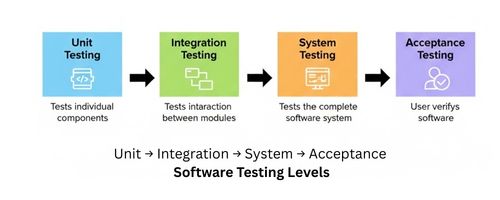
Software Testing Levels विभिन्न स्तरों पर software की quality, functionality और reliability सुनिश्चित करने के लिए अपनाए जाते हैं। हर level का अपना उद्देश्य है, और यह defects detect करने का अलग-अलग perspective provide करता है।
Software Testing Levels मुख्यतः 6 प्रकार के होते हैं :
- Unit Testing
- Integration Testing
- System Testing
- Acceptance Testing
- Regression Testing
- Smoke & Sanity Testing
1. Unit Testing (यूनिट टेस्टिंग)
Unit Testing में software के सबसे छोटे module, function या component को independent रूप से test किया जाता है। इसका main focus होता है, module correctness और internal logic verify करना।
Key Points
- Developers द्वारा perform किया जाता है
- Early defect detection possible है।
- Individual functions या methods test होते हैं
- Mostly automated testing use होती है
Advantages
- Bugs जल्दी detect हो जाते हैं, जिससे fixing की cost कम होती है।
- Modules को independent तरीके से check किया जा सकता है।
- Code की overall quality improve होती है।
Disadvantages
- केवल single module test होता है, इसलिए integration के दौरान आने वाले errors detect नहीं होते।
- Test data तैयार करना time-consuming होता है।
Tools: JUnit, NUnit, PyTest
2. Integration Testing (इंटीग्रेशन टेस्टिंग)
Integration Testing में अलग-अलग modules को combine करके उनके interaction, data flow और interfaces को validate किया जाता है। इसका main goal होता है, यह check करना कि modules एक-दूसरे के साथ सही तरीके से काम कर रहे हैं या नहीं।
Key Points
- Focus : Data communication between modules
- Types : Top-Down, Bottom-Up, Big Bang
- Interface defects detect करता है
- Unit Testing के बाद perform किया जाता है
Advantages
- Interface defects को early stage पर detect किया जा सकता है।
- Modules की compatibility check होती है
- System Testing का risk reduce होता है
Disadvantages
- Large और complex applications में integration करना Difficult हो सकता है।
- अलग-अलग teams के बीच अच्छा coordination जरूरी है।
Tools : JUnit (integration), Selenium, TestNG
3. System Testing (सिस्टम टेस्टिंग)
System Testing में पूरे software system को end-to-end validate किया जाता है। इसका उद्देश्य यह सुनिश्चित करना है, कि software functional और non-functional requirements दोनों को सही तरीके से पूरा कर रहा है।
Key Points :
- Conduct किया जाता है real या simulated environment में।
- Types : Functional, Non-functional (Performance, Load, Security, Usability)
- System-level defects detect करता है
Advantages :
- पूरे software की complete validation होती है।
- End-user requirements ensure होती हैं
- Large-scale या mission-critical applications के लिए बहुत जरूरी।
Disadvantages :
- Time-consuming process है।
- Full system environment की जरूरत होती है।
- High resource usage demand करता है।
Tools : Selenium, LoadRunner, JMeter, Postman
4. Acceptance Testing (एक्सेप्टेंस टेस्टिंग)
Acceptance Testing में software को client या end-user के perspective से validate किया जाता है। इसका main goal यह है, कि यह verify किया जा सके कि software business और user requirements को पूरी तरह satisfy कर रहा है या नहीं।
Key Points :
- Check करता है, कि software business और user requirements को meet करता है, या नहीं।
- Types : Alpha Testing (internal), Beta Testing (real users)
- Release से पहले perform किया जाता है
Advantages
- User satisfaction सुनिश्चित करता है।
- Missing requirements को identify करने में मदद करता है।
- Real user feedback उपलब्ध होता है।
Disadvantages
- Testing scope limited होता है।
- Success heavily user participation पर dependent होती है।
5. Regression Testing (रिग्रेशन टेस्टिंग)
Regression Testing का उद्देश्य यह verify करना है, कि software में changes या bug fixes करने के बाद भी existing features सही तरीके से काम कर रहे हैं, और कोई नया defect नहीं आया।
Key Points :
- Software stability ensure करता है
- Continuous Delivery / CI-CD pipelines में यह बहुत critical है।
- Automation के द्वारा इसे faster और efficient बनाया जा सकता है।
Advantages :
- Changes के बाद reliability maintain होती है
- Updates के side-effects detect होते हैं
- Frequent releases और updates को support करता है।
Disadvantages :
- Repetitive और time-consuming
- Automation setup की initial cost high
Tools : Selenium, QTP/UFT, TestNG, Jenkins
6. Smoke Testing (स्मोक) & Sanity Testing (सैनिटी)
- Smoke Testing : Smoke Testing में software के major functionalities का basic sanity check किया जाता है, ताकि यह पता चल सके कि system overall काम कर रहा है या नहीं।
- Sanity Testing : Sanity Testing में software में minor changes या bug fixes के बाद सिर्फ specific functionality verify की जाती है।
Key Points :
- Smoke : Overall system functionality verify होती है।
- Sanity : केवल updated या affected modules check किए जाते हैं।
Advantages :
- Software में major issues जल्दी पता लगते हैं।
- Unnecessary testing reduce होता है
Disadvantages :
- Detailed या in-depth testing नहीं होती।
- केवल initial या basic functionality ही verify होती है।
Testing Tools – कौन‑कौन से Tools Use होते हैं?
| Tool Name | Type | Purpose / Use |
|---|---|---|
| Selenium | Automation | Web Application Testing |
| JIRA | Bug Tracking / Project Management | Defect Tracking, Assign, Report |
| QTP / UFT | Automation | Functional Testing for Web/Desktop/Mobile |
| Postman | API Testing | API Request/Response Validation |
| LoadRunner | Performance Testing | Load / Stress Testing, Response Time Analysis |
| TestNG / JUnit | Unit Testing | Code Level Testing, Automation |
| Appium | Mobile Automation | Mobile App Testing (Android/iOS) |
| Bugzilla | Bug Tracking | Defect Tracking और Reporting |
Conclusion (निष्कर्ष)
- Software Testing केवल bugs ढूँढने का तरीका नहीं, बल्कि software की quality और reliability ensure करता है।
- Early testing से bugs जल्दी detect होते हैं और fixing cost कम होती है।
- Testing Levels (Unit → Integration → System → Acceptance) से defects structured तरीके से identify होते हैं।
- Manual + Automation Testing मिलकर accurate और fast results देते हैं।
- Proper testing से IRCTC, Paytm, Flipkart जैसे systems में smooth, secure और user-friendly software मिलता है।
FAQ (Frequently Asked Questions)
Q1. Software Testing क्या है?
Software Testing एक planned और systematic process है, जिसमें software को run करके bugs, errors और defects detect किए जाते हैं और यह ensure किया जाता है कि software user requirements meet करे।
Q2. Unit Testing और Integration Testing में क्या अंतर है?
- Unit Testing: Single module या function को independently test करना।
- Integration Testing: Multiple modules के interaction और data flow को test करना।
Q3. Manual Testing और Automation Testing में मुख्य अंतर क्या है?
- Manual Testing: Human tester test करता है।
- Automation Testing: Tools जैसे Selenium, JMeter, TestNG से test automatically execute होता है।
Q4. System Testing और Acceptance Testing में क्या अंतर है?
- System Testing: Complete software system का end-to-end test testing team द्वारा।
- Acceptance Testing: Final software को user/customer verify करता है कि requirements meet हो रही हैं या नहीं।
Q5. Regression Testing कब की जाती है?
Software update, bug fix या new feature addition के बाद, यह check करने के लिए कि previous functionality सही से काम कर रही है।
Q6. Defect Severity और Priority का मतलब क्या है?
- Severity: Bug का system पर impact कितना है।
- Priority: Bug को कितनी जल्दी fix करना है।
Q7. Software Testing में commonly कौन-कौन से tools use होते हैं?
Selenium, JIRA, TestNG, JMeter, Postman, Bugzilla आदि।