

Testing Tools
Testing Tools ऐसे software programs होते हैं, जो किसी application, software या system की quality, performance, functionality और reliability को check करने के लिए किया जाता है। ये tools manual testing को आसान बनाते हैं, और automation के through test scripts run करके bugs और defects को जल्दी detect करते हैं।
Table of Contents
ToggleKey Points
- Software Quality Assurance : Testing Tools software की reliability और accuracy ensure करते हैं।
- Bug Detection : Errors, defects और inconsistencies को identify करने में मदद करते हैं।
- Manual और Automated Support : कुछ tools manual testing के लिए, कुछ automated testing के लिए use होते हैं।
- Efficiency Increase : Testing process को faster और organized बनाते हैं।
- Reporting : Test results, defects और reports generate करने में मदद करते हैं।
- Cross-platform Testing : Web, Mobile और API testing support करने वाले tools available हैं।
Testing & Testing Tools क्यों जरूरी है
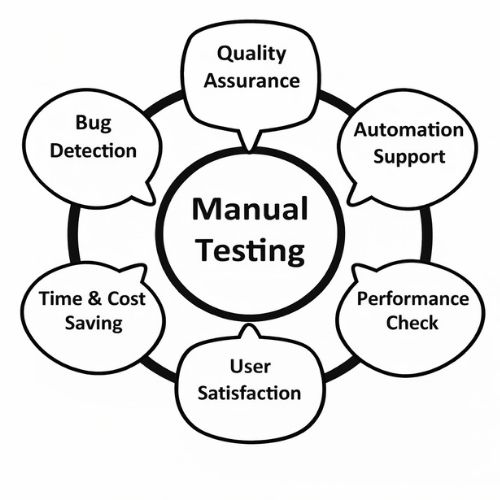
- Bug Detection : Testing के जरिए Software में मौजूद Errors, Bugs और Defects को जल्दी identify किया जाता है।
- Quality Assurance : यह ensure करता है कि Software user की requirements के अनुसार सही और smoothly काम कर रहा है।
- Time & Cost Saving : Early stage पर bugs detect होने से बाद में fixing में लगने वाला time और cost दोनों कम हो जाते हैं।
- Automation Support : Selenium, JMeter जैसे Testing Tools repetitive test cases को automatically execute करके manual effort कम करते हैं।
- Performance Check : Heavy load और high traffic conditions में भी system stable रहे, इसके लिए Performance Testing Tools का use किया जाता है।
- User Satisfaction : Error-free, fast और smooth software user का confidence और trust बढ़ाता है।
- Security & Reliability : Testing के through security vulnerabilities और system failures को पहले ही detect करके software को safe और reliable बनाया जाता है।
Types of Testing Tools (टेस्टिंग टूल्स के प्रकार)
S.No | Tool Type | Purpose | Used By |
1. | Test Management Tools | इन tools का उपयोग Test Planning, Test Case creation, Scheduling, Execution status, Defect logging, Tracking और Reporting के लिए किया जाता है। ये पूरे Testing process को organized बनाते हैं। | Testers |
2. | Configuration Management Tools | Software के अलग-अलग versions, source code, documents और changes को manage करने के लिए। यह सुनिश्चित करता है कि सही version पर testing हो रही है। | All Team Members |
3. | Static Analysis Tools | बिना program run किए source code में errors, coding standard violation और logical mistakes को detect करने के लिए। | Developers |
4. | Test Data Preparation Tools | Testing के लिए required valid, invalid और boundary value data generate करने में मदद करते हैं, जिससे real-time scenarios test किए जा सकें। | Testers |
5. | Test Execution Tools | Test cases को manually या automatically run करने, result capture करने और reports generate करने के लिए। | Testers |
6. | Test Comparators | Expected Result और Actual Result को compare करके difference (defect) identify करने के लिए। | All Team Members |
7. | Coverage Measurement Tools | यह check करते हैं कि program का कितना भाग (statements, branches, paths) testing के दौरान execute हुआ है। इसे Code Coverage कहते हैं। | Developers |
8. | Performance Testing Tools | System की Speed, Load Handling Capacity, Response Time और Stability को heavy users के under test करने के लिए। | Testers |
9. | Project Planning & Tracking Tools | Project schedule, resources, milestones और progress monitor करने के लिए ताकि testing time पर complete हो। | Project Managers |
10. | Incident Management Tools | Defects, failures और issues को record, assign, track और resolve करने के लिए। इन्हें Bug Tracking Tools भी कहते हैं। | Testers |
Testing Tools Role in SDLC (Software Development Life Cycle)
1. Requirement Analysis Phase
- इस चरण में user की सभी जरूरतों (Requirements) को समझकर proper तरीके से document किया जाता है।
Testing Tools Role
- Requirement Management Tools : JIRA, Confluence, DOORS
- Requirements को store और track करना
- Ambiguous (अस्पष्ट) requirements को identify करना
- RTM (Requirement Traceability Matrix) बनाना ताकि, हर requirement का test case से mapping हो सके
2. Test Planning Phase
- इस phase में पूरी Testing Strategy, resources, time और cost plan की जाती है।
- Tools Used : Test Management Tools : TestRail, Zephyr, HP ALM
Testing Tools Role
- Test Plan और Test Strategy तैयार करना
- Automation Tools selection (Selenium, JMeter, Postman)
- Schedule और Effort Estimation बनाना
- Risk Analysis करना
3. Test Case Design Phase
- इस चरण में detailed Test Cases और Automation Scripts बनाए जाते हैं।
- Tools :
- Test Case Tools : TestRail, Excel, JIRA
- Automation Tools : Selenium, Cypress, Appium
Testing Tools Role
- Functional और Non-Functional Test Cases design करना
- Reusable Automation Scripts develop करना
- Requirement और Test Case की proper mapping maintain करना
4. Test Environment Setup Phase
- Testing के लिए real-world जैसा environment तैयार किया जाता है।
- Tools :
- Virtual Machines : VMware, VirtualBox
- Cloud Platforms : BrowserStack, Sauce Labs
- CI/CD Tools : Jenkins
Testing Tools Role
- Multiple OS, Browsers और Mobile Devices पर testing की सुविधा
- Database, Server और Network Configuration manage करना
5. Test Execution Phase
- इस phase में actual testing perform की जाती है।
- Functional Testing
- Tools : Selenium, UFT, Appium
- Role : Application के features सही काम कर रहे हैं या नहीं, यह verify करना
- Performance Testing
- Tools : JMeter, LoadRunner
- Role : Load, Stress, Response Time और Scalability check करना
- Security Testing
- Tools : Burp Suite, OWASP ZAP
- Role : Security vulnerabilities और cyber attacks से protection verify करना
- API Testing
- Tools : Postman, SoapUI
- Role : Backend services और Microservices की functionality test करना
6. Defect Reporting & Tracking Phase
- इस चरण में पाए गए bugs को record और track किया जाता है।
- Tools : JIRA, Bugzilla, Mantis
Testing Tools Role
- Bug Life Cycle maintain करना
- Severity और Priority assign करना
- Developer और Tester के बीच communication improve करना
7. Test Closure & Maintenance Phase
- Release के बाद भी Software की quality ensure की जाती है।
- Tools :
- Regression Automation Tools : Selenium, Cypress
- Monitoring Tools : Grafana, New Relic
Testing Tools Role
- Regression Testing automate करना
- Production issues monitor और analyze करना
- Final Test Reports और Quality Metrics generate करना
Conclusion (निष्कर्ष)
- Testing Tools software की quality, performance, security और reliability ensure करते हैं।
- Manual और Automation दोनों तरह की testing को support करते हैं।
- Bugs और defects को जल्दी detect करने में मदद करते हैं।
- SDLC के हर phase में planning, execution और reporting को easy बनाते हैं।
- Time और cost बचाकर testing process को fast और efficient बनाते हैं।
- User को stable, secure और smooth software experience provide करते हैं।
अक्सर पूछे जाने वाले प्रश्न (FAQ) –
Q1. Testing Tools क्या होते हैं?
- Testing Tools ऐसे software होते हैं, जो application की quality, functionality, performance और security को check करने के लिए use किए जाते हैं।
Q2. Testing Tools क्यों जरूरी हैं?
- ये bugs जल्दी detect करते हैं, time और cost बचाते हैं और software को reliable बनाते हैं।
Q3. Manual और Automation Tools में क्या अंतर है?
- Manual Tools में tester खुद steps perform करता है, जबकि Automation Tools (जैसे Selenium, JMeter) scripts के through automatically testing करते हैं।
Q4. Test Management Tool का क्या काम है?
- Test Planning, Test Case Management, Execution Tracking और Defect Reporting करना। (जैसे JIRA, TestRail)
Q5. Performance Testing Tools का उद्देश्य क्या है?
- Heavy load में system की speed, response time और stability check करना। (जैसे JMeter, LoadRunner)
Q6. SDLC में Testing Tools का क्या role है?
- हर phase में Requirement से लेकर Maintenance तक planning, execution, defect tracking और reporting में support देना।
Q7. क्या एक ही tool से सारी testing हो सकती है?
- नहीं, अलग-अलग purpose के लिए अलग-अलग tools use किए जाते हैं जैसे Automation, Performance, Security, API Testing आदि।