I/O Interface (I/O Interface क्या है?)
I/O Interface (Input/Output Interface) एक hardware component या controller होता है, जो CPU और Input/Output devices (जैसे Keyboard, Mouse, Printer, Hard Disk आदि) के बीच data communication को manage और control करता है।
Table of Contents
Toggleयह data transfer को synchronize करता है, और speed mismatch (Fast CPU vs Slow device) को manage करता है।
Key Points
- CPU और Peripheral Devices के बीच communication bridge का काम करता है
- Data transfer को control और manage करता है
- Speed mismatch (Fast CPU vs Slow Device) को balance करता है
- Buffer memory का उपयोग करता है
- Interrupt handling को support करता है
- Error detection और correction में मदद करता है
- Address decoding करता है
- Data format conversion (Parallel ↔ Serial) कर सकता है
Why is I/O Interface Needed?
(I/O Interface की आवश्यकता क्यों होती है?)
- Balancing Speed Mismatch
- CPU की speed GHz में होती है, जबकि I/O devices slow होते हैं।
- I/O Interface दोनों के बीच speed difference को manage करता है।
- Example : जब आप USB drive से movie copy करते हैं, तो CPU बहुत fast है लेकिन USB की speed limited होती है। Interface data flow को control करता है।
- Data Transfer Control
- I/O Interface data को सही device तक भेजता है और control signals manage करता है।
- Example : Print command देने पर data सही तरीके से Printer तक पहुँचता है।
- Buffering facility
- I/O Interface temporary storage (Buffer) का उपयोग करता है जिससे data loss ना हो।
- Example : Online payment करते समय transaction data buffer में store होकर safely process होता है।
- Interrupt Handling
- जब कोई device CPU का attention चाहता है (जैसे Keyboard key press), तो वह interrupt signal भेजता है।
- I/O Interface इस interrupt को manage करता है।
- Device Identification And Addressing
- Computer में कई devices connected होते हैं।
- I/O Interface पहचानता है कि कौन-सा data किस device के लिए है।
- Error Detection
- Data transfer के दौरान error हो सकता है।
- Interface error detect और कभी-कभी correct भी करता है।
- Data Format Conversion
- कुछ devices serial और कुछ paralleldata data use करते हैं।
- I/O Interface data format conversion भी कर सकता है।
Types of I/O Bus
Computer system में कई प्रकार के buses होते हैं :
- Data Bus
- Address Bus
- Control Bus
- Expansion Bus (जैसे PCI, SCSI, USB)
1. PCI Bus (Peripheral Component Interconnect)
PCI Bus (Peripheral Component Interconnect) एक high-speed parallel expansion bus है, जो motherboard में internal peripheral devices को CPU और memory से connect करने के लिए उपयोग की जाती है।
- यह high-speed, processor independent bus है।
- Plug and Play feature support करती है।
- Shared bus architecture पर काम करती है।
History of PCI Bus (PCI Bus का इतिहास)
- 1992 में Intel द्वारा PCI (Peripheral Component Interconnect) Bus को develop किया गया।
- इसे पुरानी ISA और EISA Bus की limitations (कम speed, compatibility issues) को दूर करने के लिए बनाया गया।
- PCI Bus ने Plug and Play feature introduce किया, जिससे device install करना आसान हो गया।
Key Features (PCI Bus की मुख्य विशेषताएँ)
- 32-bit और 64-bit Data Transfer – High data width support करता है।
- High Bandwidth – 33 MHz और 66 MHz clock speed पर काम करता है।
- Plug and Play Support – Automatic device detection और configuration।
- Shared Bus Architecture – Multiple devices एक ही bus को share करते हैं।
- Processor Independent – किसी specific processor architecture पर निर्भर नहीं।
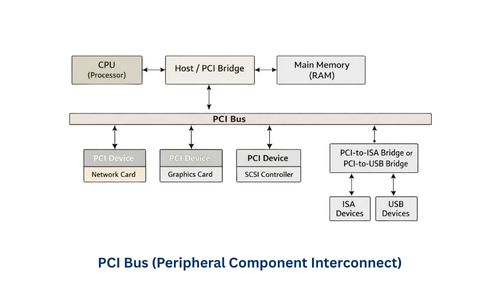
PCI Bus Working (कार्यप्रणाली)
- CPU किसी peripheral device को access करने का request भेजता है।
- Address Bus target device का address भेजती है।
- Control Bus Read/Write signal भेजती है।
- Data Bus actual data transfer करती है।
- Device अपना response वापस CPU को भेजता है।
Applications
PCI Bus का उपयोग Motherboard के expansion slots में किया जाता है, जैसे :
- Graphics Card
- Network Interface Card (NIC)
- Sound Card
- RAID Controller
- WiFi Adapter
PCI Bus के Advantages (फायदे)
- High-Speed Data Transfer – PCI Bus 32-bit और 64-bit data transfer को support करती है, जिससे devices के बीच data तेजी से transfer होता है।
- Standardized Architecture – यह एक standard bus architecture है, इसलिए अलग-अलग manufacturers के devices आसानी से compatible रहते हैं।
- Multiple Device Support – एक ही PCI Bus पर कई peripheral devices connect किए जा सकते हैं।
- Reliable Performance – Stable communication और कम error rate के कारण system performance बेहतर रहता है।
PCI Bus के Disadvantages (कमियाँ)
- Shared Bandwidth – सभी devices एक ही bus share करते हैं, जिससे एक साथ कई devices use होने पर speed कम हो सकती है।
- Limited Slots – Motherboard में PCI slots की संख्या सीमित होती है, इसलिए expansion की सीमा रहती है।
- Outdated Technology – Modern systems में इसे PCI Express (PCIe) ने replace कर दिया है, जो ज्यादा speed और dedicated bandwidth प्रदान करता है।
2. SCSI Bus (Small Computer System Interface)
SCSI (Small Computer System Interface) एक high-performance interface standard है, जिसका उपयोग computer और peripheral devices (विशेषकर Hard Disk, Scanner, Tape Drive आदि) के बीच data transfer के लिए किया जाता है।
Objective of SCSI (SCSI Bus का उद्देश्य)
SCSI (Small Computer System Interface) को इस उद्देश्य से develop किया गया था कि :
- Multiple devices एक साथ connect किए जा सकें।
- Faster data transfer प्राप्त हो सके।
- Reliable storage solution उपलब्ध कराया जा सके।
- Enterprise-level systems (जैसे servers, data centers) को support किया जा सके।
Key Features (SCSI Bus की मुख्य विशेषताएँ)
- Multiple Device Support – एक SCSI bus पर 7 या 15 devices तक connect किए जा सकते थे।
- Daisy-Chain Connection – Devices को एक के बाद एक chain के रूप में connect किया जाता था।
- High Data Transfer Speed – अपने समय के अनुसार यह काफी fast technology थी।
- Intelligent Controller – SCSI Controller devices को manage और control करता है।
- Reliable And Stable Performance – Enterprise environment में लंबे समय तक stable performance देता था।
- Command-Based Communication – CPU सीधे device से नहीं, बल्कि commands के माध्यम से controller से communicate करता है।
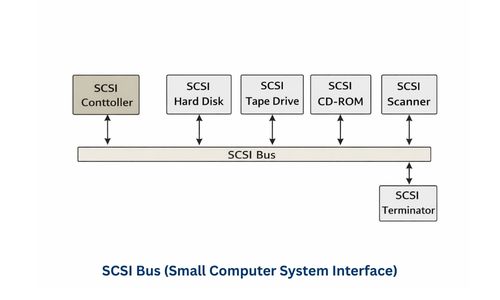
SCSI Bus Working (कार्यप्रणाली)
- CPU, SCSI Controller को command भेजता है।
- Controller target device को select करता है।
- Device command को execute करता है।
- Data transfer होता है।
- Status report वापस CPU को भेजी जाती है।
Applications
- Enterprise Servers
- High-Speed Storage Systems
- Research Labs
- Banking Data Centers
- Database Servers
SCSI Bus के प्रकार (Types of SCSI)
- Narrow SCSI (8-bit)
- 8-bit data bus का उपयोग करता है।
- सामान्यतः 7 devices तक support करता था।
- Wide SCSI (16-bit)
- 16-bit data bus support करता है।
- 15 devices तक connect किए जा सकते थे।
- Narrow SCSI से अधिक speed और performance।
- Ultra SCSI
- Faster clock speed के कारण data transfer rate बढ़ा।
- High-speed और enterprise storage systems में उपयोग।
- Ultra2 SCSI
- Low Voltage Differential (LVD) technology का उपयोग।
- लंबी cable length और बेहतर signal quality।
- Ultra320 SCSI
- लगभग 320 MB/s तक data transfer speed।
- High-performance servers और data centers में popular।
SCSI Bus Advantages
- Multiple Devices Support – एक ही bus पर कई devices connect किए जा सकते हैं।
- Reliable Data Transfer – Stable और error-free communication।
- High Performance – Enterprise-level workloads के लिए उपयुक्त हैं।
- Enterprise Usage – Servers, Data Centers और Database Systems में उपयोगी हैं।
SCSI Bus Disadvantages
- Expensive Technology – Hardware और setup cost अधिक होती हैं।
- Complex Configuration – ID setting और termination जैसी manual configuration की आवश्यकता होता हैं।
- Large & Bulky Cables – Installation में ज्यादा space लेती हैं।
- Outdated Technology – Modern systems में इसे Serial ATA (SATA) और NVMe ने replace कर दिया है, जो ज्यादा fast और efficient हैं।
3. USB (Universal Serial Bus)
USB (Universal Serial Bus) एक serial communication interface है, जिसका उपयोग Computer और external devices (जैसे Keyboard, Mouse, Printer, Pen Drive, Mobile आदि) के बीच data transfer और power supply के लिए किया जाता है।
Key Features (USB की मुख्य विशेषताएँ)
- Plug and Play : Device connect करते ही automatically detect हो जाती है।
- Hot Swapping : System बंद किए बिना device connect या remove कर सकते हैं।
- Power + Data Transfer : एक ही USB cable से data और power दोनों transfer होते हैं।
- Universal Standard : लगभग सभी modern devices USB support करते हैं।
- Automatic Configuration : Driver auto-install हो जाता है।
USB Versions and Their Speeds
| Version | Speed | Use |
|---|---|---|
| USB 1.0 | 12 Mbps | Basic devices |
| USB 2.0 | 480 Mbps | Common devices |
| USB 3.0 | 5 Gbps | High-speed transfer |
| USB 3.1 | 10 Gbps | Advanced devices |
| USB 3.2 | 20 Gbps | Professional use |
| USB4 | 40 Gbps | Modern high-performance |
USB Connectors के प्रकार
- USB Type-A
- USB Type-B
- Mini USB
- Micro USB
- USB Type-C
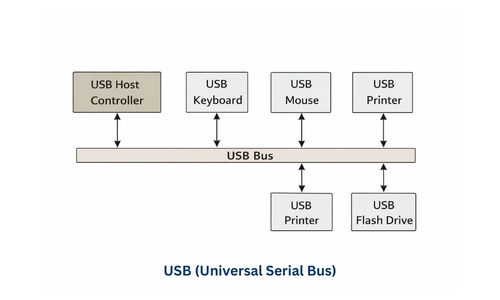
USB Working (कार्यप्रणाली)
- Device USB port में insert किया जाता है।
- Host (Computer) device को detect करता है।
- Device को address assign किया जाता है।
- Driver load होता है।
- Data transfer शुरू हो जाता है।
USB Architecture
USB system में 3 मुख्य components होते हैं :
- Host
- Computer या laptop
- Communication control करता है
- Hub
- Multiple devices connect करने देता है
- Ports expand करता है
- Device
- Mouse, keyboard, pen drive आदि
Applications
- Pen Drive
- Printer
- Mouse
- Keyboard
- Smartphone
- Game Controller
- Digital Camera
- External Hard Disk
- Headphones
- Webcam
USB Advantages
- Easy Installation (Plug and Play) – Device connect करते ही detect हो जाती है।
- Hot Swapping – System बंद किए बिना device connect/remove कर सकते हैं।
- Fast Data Transfer – USB 3.0, 3.1 और USB4 high-speed data transfer support करते हैं।
- Power + Data Support – एक ही cable से data और power दोनों मिलते हैं।
- Universal Compatibility – लगभग सभी modern devices USB support करते हैं।
- Portable And Low Cost – USB devices हल्के और सस्ते होते हैं।
- Expandable – USB Hub से multiple devices connect किए जा सकते हैं।
- Automatic Driver Installation – OS automatically driver install कर देता है।
USB Disadvantages
- Limited Cable Length – Effective range लगभग 5 meter तक
- Shared Bandwidth – Multiple devices एक ही bus share करते हैं।
- Virus Risk – Pen Drive या USB devices से malware फैल सकता है।
- Physical Damage Risk – Port loose या damaged हो सकता है।
- Power Limitation – High-power devices के लिए external supply चाहिए।
- Data Security Risk – USB devices से sensitive data leak हो सकता है।
PCI vs SCSI vs USB – Comparison Table
Feature | PCI Bus | SCSI Bus | USB (Universal Serial Bus) |
Full Form | Peripheral Component Interconnect | Small Computer System Interface | Universal Serial Bus |
Type | Internal parallel expansion bus | Parallel / Storage Interface | External serial interface |
Primary Use | Internal devices like Graphics Card, Sound Card, Network Card | High-speed storage, Enterprise servers, RAID, Tape drives | External devices like Pen Drive, Printer, Mouse, Keyboard, Scanner, Smartphone |
Data Transfer Method | Parallel | Parallel | Serial |
Speed | Moderate – 33 MHz (32-bit) / 66 MHz (64-bit) | High (5–20 MB/s old standard, up to 320 MB/s Ultra320) | Very High – USB 2.0: 480 Mbps, USB 3.0: 5 Gbps, USB 3.1: 10 Gbps, USB4: 40 Gbps |
Bus Width | 32-bit या 64-bit | 8-bit (Narrow), 16-bit (Wide) | 4–9 pins depending on Type (Type-A, Type-B, Type-C) |
Direction | Bidirectional | Bidirectional | Bidirectional |
Device Support | Multiple internal devices (limited by slots) | Multiple storage devices (up to 7 narrow / 15 wide) | Multiple external devices (up to 127 devices via hubs) |
Hot Swapping | Limited / Not common | Limited | Yes (Device remove/insert without system shutdown) |
Power Supply | No (requires separate power connector) | No (requires separate power) | Yes (5V via cable for small devices) |
Cost | Moderate | Expensive | Low |
Ease of Use | Technical knowledge needed | Complex configuration and setup | Very Easy, Plug & Play |
Configuration | Plug-in motherboard slots | Requires SCSI ID configuration, terminators for bus | Automatic device detection, driver installation |
Modern Usage | Mostly replaced by PCIe (PCI Express) | Mostly replaced by SATA, SAS, NVMe in modern storage | Still very common and universal for external devices |
Topology | Shared bus (Multiple devices share same bus) | Daisy-chain or Star topology | Tree topology (Host → Hub → Device) |
Error Handling | Depends on controller | Built-in commands & error checking | Built-in protocol for data integrity |
Compatibility | Motherboard dependent | Requires compatible SCSI controller & cable | Universal – supports almost all devices |
Example | Graphics card, Network card in Desktop PC | RAID storage server in Data Center, ISRO storage systems | Pen Drive, USB Mouse/Keyboard, Printer, Mobile Charging |
Advantages | High-speed internal communication, Standardized, Reliable | Reliable high-speed storage, Multiple devices, Enterprise use | Universal, Plug & Play, Hot Swappable, Data + Power support, Easy |
Disadvantages | Shared bandwidth, Limited slots, Mostly outdated | Expensive, Complex setup, Bulky cables | Limited cable length, Shared bandwidth, Virus risk, Physical port damage |
I/O Processor
I/O Processor (Input/Output Processor) एक special-purpose processor है, जो Computer System में Input और Output devices (जैसे Keyboard, Printer, Hard Disk, Network devices) को manage और control करता है।
यह CPU से अलग काम करता है, और I/O instructions को independently execute करता है। जिससे CPU free रहता है और main processing tasks पर focus कर सकता है।
Key Points
- I/O Processor सिर्फ I/O operations के लिए dedicated होता है।
- CPU के बिना भी I/O tasks perform कर सकता है।
- कुछ I/O Processors के पास अपनी local memory होती है जिससे data handling तेज़ होती है।
- CPU को free रखता है और I/O operations parallel में होते हैं।
- High-speed devices (Disk, Network, Printer) के साथ efficient communication possible बनाता है।
- I/O Processor Direct Memory Access (DMA) के साथ work करता है।
Why I/O Processor was needed?
(I/O प्रोसेसर की ज़रूरत क्यों पड़ी?)
Modern computer systems में CPU सिर्फ calculations और program execution के लिए design किया गया था। लेकिन जैसे-जैसे Input/Output devices (Keyboard, Mouse, Printer, Disk, Network) बढ़े और data transfer की speed requirements बढ़ी, CPU खुद I/O operations handle करने में fail होने लगा।
मुख्य कारण (Key Reasons)
- Reducing CPU Overload
- पहले CPU को हर I/O instruction खुद execute करना पड़ता था।
- इससे CPU का main work (Arithmetic/Logic) slow हो जाता था।
- I/O Devices are Slow
- Keyboard, Printer, Disk जैसे devices CPU की speed से बहुत slow हैं।
- अगर CPU इन्हें wait करता रहा, तो वह idle हो जाता।
- Need for High-Speed Data Transfer
- Large data transfer (जैसे ISRO satellites, Flipkart database, Paytm transactions) के लिए fast I/O handling जरूरी थी।
- Parallel Processing / Multi-tasking
- CPU और I/O को अलग करने से CPU calculations और I/O operations parallel चल सकते हैं।
- System throughput और efficiency बढ़ जाती है।
- Simplifying Interrupt Handling
- I/O Processor I/O completion पर CPU को interrupt भेजता है।
- CPU बिना continuous checking के other tasks पर focus कर सकता है।
Key Features (I/O Processor की मुख्य विशेषताएँ)
- Dedicated Processor
- I/O tasks के लिए विशेष रूप से design किया गया है।
- CPU की तरह general computation नहीं करता, सिर्फ Input/Output devices handle करता है।
- Independent Operation
- CPU से अलग काम करता है।
- CPU busy रहते हुए भी I/O operations continue हो सकते हैं।
- Own Local Memory
- कुछ I/O Processors में local memory/registers होती हैं।
- Data temporarily store करके I/O operations fast बनाता है।
- Interrupt Mechanism
- I/O operation complete होने पर CPU को interrupt signal भेजता है।
- CPU को continuous waiting करने की जरूरत नहीं होती।
- High-Speed Data Transfer
- CPU idle हुए बिना fast data transfer possible बनाता है।
- Large data blocks efficiently memory और device के बीच move करता है।
- Supports DMA (Direct Memory Access)
- DMA के साथ काम करके CPU bypass कर direct memory-device transfer allow करता है।
- Enables Parallel Processing
- CPU main processing करता है, I/O Processor I/O tasks संभालता है।
- System throughput और efficiency दोनों बढ़ती हैं।
- Used in High-Performance Systems
- Servers, Mainframes, Supercomputers और Enterprise systems में IOP essential है।
I/O Processor Architecture
I/O Processor (IOP) का main purpose है, Input और Output devices को efficiently manage करना। इसके architecture में कुछ essential components होते हैं, जो इसे CPU से independent और high-speed बनाते हैं।
Main Components of I/O Processor
- I/O Registers
- Temporary data storage के लिए use होते हैं।
- Control Logic
- I/O devices को control करने के लिए commands generate करता है।
- यह decide करता है कि कौन सा device कब और कैसे access होगा।
- Local Memory
- कुछ I/O Processors में अपनी छोटी memory होती है।
- Buffer के रूप में काम करता है और data को temporarily store करता है।
- Communication Bus
- CPU, memory और I/O devices के बीच data transfer के लिए उपयोग होता है।
- High-speed bus system I/O को fast बनाता है।
- Device Interface
- Physical I/O devices (Printer, Keyboard, Disk) से connect करता है।
- Device-specific protocols और signaling manage करता है।
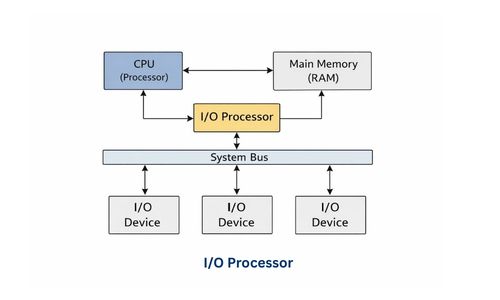
Working Flow
- CPU Sends Command
- CPU IOP को specific I/O operation के लिए instruction भेजता है।
- Device Select
- IOP, control logic और device interface के through target device select करता है।
- Data Transfer
- Data memory से device या device से memory में transfer होता है।
- Local memory या buffer data temporarily hold करता है।
- Completion Signal
- Operation complete होने पर IOP CPU को interrupt signal भेजता है।
- CPU अगले task पर continue करता है।
I/O Techniques (I/O Methods)
- Programmed I/O (Programmed Input/Output)
- इसमें CPU खुद I/O instructions execute करता है।
- CPU continuously device status check करता है (polling) और data read/write करता है।
- Interrupt-Driven I/O
- Device ready होने पर CPU को interrupt signal भेजता है।
- CPU तब ही data read/write करता है।
- Direct Memory Access (DMA)
- Data CPU bypass करके directly memory ↔ device transfer होता है।
- CPU सिर्फ start और end signals handle करता है।
- I/O Processor Method
- Dedicated I/O Processor (IOP) I/O tasks handle करता है।
- CPU independent रहता है।
Types of IOP (I/O Processor के प्रकार)
1. Channel I/O Processor
- Mostly Mainframes और High-end Servers में use होता है।
- Large-scale I/O operations को efficiently handle करता है।
- CPU को free रखता है, जबकि Channel Processor I/O devices को manage करता है।
Features :
- Parallel processing support
- High-speed data transfer
- Complex I/O operations के लिए suitable
Example : IBM mainframes में channel I/O processor का use होता है।
2. Peripheral Processor
- Small I/O devices (Printer, Keyboard, Disk, Scanner) handle करता है।
- CPU और main memory से कम interaction करता है।
Features :
- Simple I/O tasks manage करता है
- Local memory और control logic के साथ काम करता है
- Device-specific processing करता है
Example : Printer controller या Scanner controller boards
I/O Processor – Advantages
- Reduces CPU Workload
- I/O tasks को independently handle करता है।
- CPU केवल main processing पर focus कर सकता है।
- Increases System Performance
- Parallel processing enable करता है।
- Large data transfer के दौरान speed बढ़ती है।
- High-Speed Data Transfer
- Devices और memory के बीच fast data movement possible होता है।
- Efficient Multi-tasking
- CPU और I/O Processor अलग-अलग tasks parallel handle कर सकते हैं।
- Reduced CPU Idle Time
- CPU I/O operations wait नहीं करता।
- Interrupt mechanism के जरिए CPU को notify करता है।
- Supports Complex I/O Devices
- Multiple devices simultaneously manage कर सकता है।
- Suitable for servers, mainframes और high-performance systems।
I/O Processor – Disadvantages
- Extra Hardware Cost
- CPU के अलावा अलग processor होने की वजह से system expensive हो जाता है।
- Complex Design
- IOP system design और programming थोड़ी complicated होती है।
- Unnecessary in Small Systems
- Simple personal computers या small embedded systems में I/O Processor की जरूरत नहीं।
- Maintenance और Troubleshooting Difficult
- High-end systems में IOP failures diagnose करना मुश्किल हो सकता है।
Conclusion (निष्कर्ष)
I/O Interface और I/O Processor दोनों ही modern computer systems में CPU और peripheral devices के बीच efficient communication सुनिश्चित करते हैं।
- I/O Interface CPU और devices के बीच data transfer, buffering, interrupt handling, error detection और data format conversion manage करता है।
- I/O Processor (IOP) dedicated processor है जो I/O tasks independently handle करता है और CPU को main processing के लिए free रखता है।
- दोनों मिलकर speed mismatch, large data transfer, parallel processing और system performance improve करते हैं।
- High-performance systems जैसे servers, mainframes, supercomputers और enterprise applications में I/O Processor essential है।
- PCI, SCSI और USB जैसे buses I/O devices को connect और communicate करने के लिए standards provide करते हैं।
अक्सर पूछे जाने वाले प्रश्न (FAQ) – I/O Interfaces, PCI, SCSI & USB
Q1. I/O Interface क्या है?
- I/O Interface CPU और peripheral devices के बीच data communication manage करने वाला hardware/controller component है।
Q2. I/O Interface की आवश्यकता क्यों होती है?
- CPU और device के बीच speed mismatch को balance करने के लिए
- Data transfer control और buffering के लिए
- Interrupt handling और error detection के लिए
- Device addressing और data format conversion के लिए
Q3. PCI Bus क्या है और इसका उपयोग क्या है?
- PCI (Peripheral Component Interconnect) Bus internal devices (Graphics Card, Sound Card, NIC) को motherboard पर CPU और memory से connect करने के लिए high-speed parallel interface है।
Q4. I/O Interface buffer क्यों use करता है?
- CPU और peripheral devices के speed mismatch को balance करने और data loss रोकने के लिए temporary storage (buffer) use किया जाता है।
Q5. I/O Interface buffer क्यों use करता है?
- CPU और peripheral devices के speed mismatch को balance करने और data loss रोकने के लिए temporary storage (buffer) use किया जाता है।
Q6. I/O Processor क्या है?
- I/O Processor (IOP) एक special-purpose processor है जो CPU से independent होकर I/O operations को efficiently handle करता है।
Q7. I/O Processor की आवश्यकता क्यों पड़ी?
- CPU overloading कम करने के लिए
- Slow I/O devices के साथ high-speed data transfer enable करने के लिए
- Parallel processing और multi-tasking facilitate करने के लिए
Q8. I/O Processor के प्रकार कौन-कौन से हैं?
- Channel I/O Processor – Mainframes और high-end servers के लिए
- Peripheral Processor – Small I/O devices जैसे Printer, Scanner के लिए