
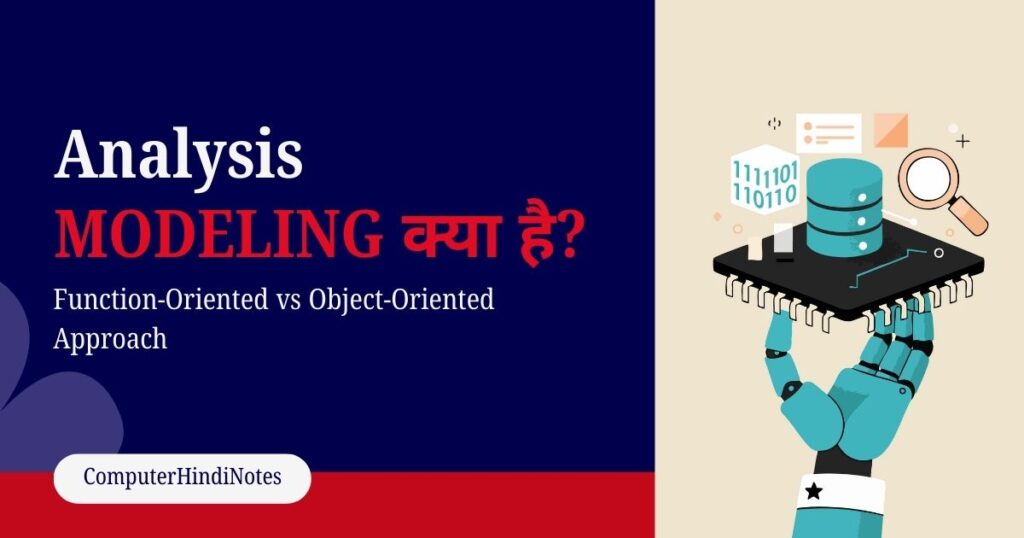
What is Analysis Modeling?
Analysis Modeling एक प्रक्रिया (Process) है, जिसमें हम software system की requirements को समझते हैं, और उन्हें diagrams, models या structured formats में represent करते हैं।
इससे Developers और Stakeholders को System की Working, Data Flow और Components आसानी से समझ में आते हैं।
Table of Contents
ToggleKey Points
- System की Functional और Non-Functional Requirements को Identify करना |
- System को DFD, Use Case Diagram, Class Diagram, Sequence Diagram जैसी Visual Form में Model करना |
- Developers, Testers और Stakeholders के बीच Clear Communication बनाना |
- Analysis Model, System Design और Implementation के लिए Base तैयार करता है |
Why Analysis Modeling is Important?
- Requirements Clarity : User और system की सभी requirements को clear, complete और unambiguous बनाता है।
- Better Communication : Client, analyst और developer के बीच clear understanding establish करता है।
- Early Error Detection : Development start होने से पहले ही missing requirements, errors और gaps identify कर लेता है।
- Cost Control : Rework और changes कम करके project का time और cost दोनों save करता है।
- Clear System Structure : System के modules, data flow और interactions को logically और clearly define करता है।
- Strong Documentation Base : SRS, design और testing documents के लिए strong foundation provide करता है।
- Risk Reduction : Large और complex software projects में failure और misunderstanding का risk कम करता है।
The Role of Analysis in Software Development
Analysis Modeling SDLC में बहुत important है। यह requirements समझने और system का base तैयार करने में मदद करता है।
- Requirements Clear करना
- Stakeholders (Clients, Users, Managers) से info लेकर Functional और Non-Functional Requirements identify करना।
- Communication Improve करना
- Analysis Models जैसे DFD, Use Case, Class Diagram, Developers और Stakeholders केबीचclear communication करना।
- Misunderstanding कम होती है।
- Error और Cost कम करना
- Requirements Clear नहीं हों, Coding और Testing में mistakes आती हैं।
- Analysis Modeling errors और project cost दोनों कम करता है।
- Foundation for Design और Coding
- Analysis Models system design और implementation के लिए base तैयार करते हैं।
- Function-Oriented Analysis → Data Flow, Process
- Object-Oriented Analysis → Objects, Classes, Interaction
- Decision Making और Planning
- System का detailed analysis project managers को resource allocation और timeline planning में मदद करता है।
- Testing और Maintenance आसान
- Analysis से बनी diagrams में Test Cases और Test Scenarios बनाना आसान होता है।
Types of Analysis Modeling
Software Engineering में analysis modeling के दो major approaches हैं :
- Function-Oriented Analysis (FOA)
- Object-Oriented Analysis (OOA)
1. Function-Oriented Modeling Techniques
Function-Oriented Modeling का मुख्य focus System के Functions / Processes और Data Flow पर होता है। इसे Structured Analysis भी कहा जाता है।
Function-Oriented Analysis में System को Processes और Data के perspective से model किया जाता है, न कि Objects से।
Main Techniques of Function-Oriented Modeling
(a) Data Flow Diagram (DFD)
Data Flow Diagram (DFD) एक Function-Oriented Analysis Modeling Technique है। यह System में Data के flow और Processes को Visual रूप में दिखाता है। DFD से पता चलता है, कि Data System में कैसे move करता है, कौन-कौन से Process उसे Modify करते हैं, और Data Store कहाँ होता है।
DFD Levels – Library Management System
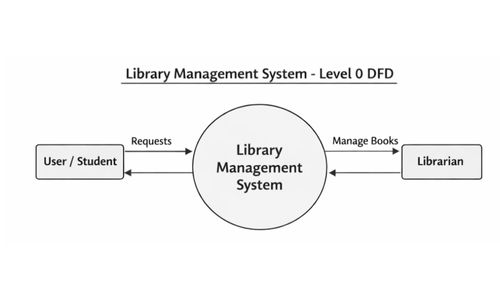
1. Level 0 DFD – Context Level
Level 0 DFD, जिसे Context Diagram भी कहते हैं, System का High-Level Overview देता है। इसमें System को एक Single Process के रूप में दिखाया जाता है, और केवल External Entities और Major Data Flows को represent किया जाता है।
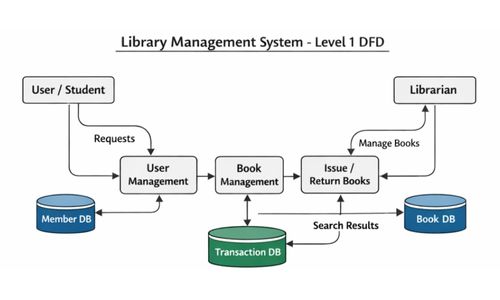
2. Level 1 DFD – Main Processes
Level 1 DFD System के Main Processes और Data Stores को Show करता है। यह Level 0 के single process को Decompose करता है।
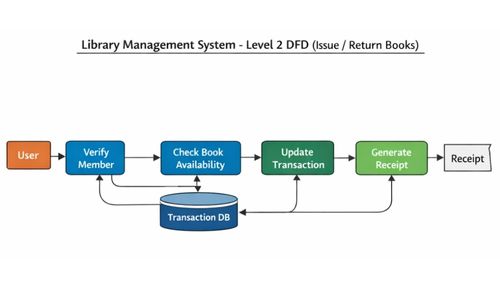
3. Level 2 DFD – Detailed Sub-Processes
Level 2 DFD Level 1 के Processes को और Detailed Sub-Processes में Breakdown करता है। यह Step-by-Step Data Flow को दिखाता है।
Advantages of DFD
- System में Data कैसे flow करता है, और कौन-कौन से processes involved हैं, यह clearly show करता है
- Complex processes को simple और easily understandable way में explain करता है
- Requirements-related errors और misunderstandings को कम करने में help करता है
- Stakeholders और Developers के बीच effective communication establish करता है
- System design, analysis और coding के लिए strong foundation provide करता है
Limitations of DFD
- System के objects, classes और real-world entities को represent नहीं करता
- Large और complex systems में DFD बहुत ज्यादा detailed होकर confusing हो सकता है
- Implementation details जैसे programming language, database या technology stack को show नहीं करता
Advantages of Function-Oriented Analysis
- Simple और easily understandable approach होती है
- Small और medium size systems के लिए ज्यादा suitable रहती है
- Logical और step-by-step thinking को develop करती है
- Procedural programming languages (जैसे C, Pascal) के लिए useful होती है
Limitations of Function-Oriented Analysis
- Data और behavior के बीच strong relationship clearly show नहीं कर पाती
- Large और complex systems में diagrams बहुत ज्यादा complicated हो जाते हैं
- Code और components की reusability कम होती है
- Requirement changes को manage करना difficult हो जाता है
Object-Oriented Software Development
Object-Oriented Software Development (OOSD) एक ऐसा Software Development Approach है जिसमें Software System को Objects और Classes के रूप में design और develop किया जाता है।
इस approach में real-world entities (जैसे User, Account, Book, Ticket) को Object की तरह model किया जाता है, जिनमें Data (Attributes) और Functions (Methods) दोनों होते हैं।
(a) Use Case Diagram
Use Case Diagram एक UML (Unified Modeling Language) diagram है, जो User और System के बीच interaction को graphical form में represent करता है।
UML की मदद से 9 different types of diagrams बनाए जा सकते हैं, जो मिलकर system के 5 important views को capture करते हैं। इन views में Use Case Diagram सबसे पहले और सबसे important role है, क्योंकि यह User View को represent करता है।
Key Points
- Use Case Diagram UML (Unified Modeling Language) का part होता है |
- इसमें User Requirements को clearly represent किया जाता है |
- System को Black Box की तरह treat किया जाता है |
- इसमें Actors, Use Cases और Relationships होते हैं |
- यह Requirement Analysis phase में बहुत useful होता है |
Five Views of System – Use Case Diagram
- User View (User Perspective)
- यह view बताता है, कि User system से क्या चाहता है, और क्या-क्या कर सकता है |
- User की requirements और expectations को represent करता है |
- Structural View
- यह view system की internal structure को show करता है |
- Classes, Objects, Attributes और Relationships दिखाई जाती हैं |
- Behavioral View
- यह view system का behavior और response explain करता है |
- बताता है कि system different situations में कैसे behave करेगा |
- Implementation View
- यह view system के code-level implementation को represent करता है |
- Software components, files और modules को show करता है |
- Environmental View (Deployment View)
- यह view system के hardware और execution environment को show करता है |
- Software कहाँ और कैसे run करेगा, यह बताया जाता है |
Advantages of Object-Oriented Analysis
- Real-world entities को easily model किया जा सकता है
- Classes और objects के कारण high reusability मिलती है
- System maintenance और modification आसान हो जाता है
- Large और complex systems के लिए सबसे ज्यादा suitable होता है
- Modern programming languages (Java, Python, C++) के साथ highly compatible है
Limitations of Object-Oriented Analysis
- Beginners के लिए concepts समझना थोड़ा complex हो सकता है
- Initial analysis और modeling में ज्यादा time लगता है
- Small projects में unnecessary overhead create कर सकता है