
User Interface Design (यूज़र इंटरफेस डिज़ाइन)
User Interface Design वह प्रक्रिया है, जिसमें किसी software, website या application के screen layout, buttons, icons, menus, colors और controls को इस तरह design किया जाता है, कि user आसानी से system को समझ सके और उससे interact कर सके।
Table of Contents
ToggleKey Points
- UI Design किसी system का overall look and feel decide करता है।
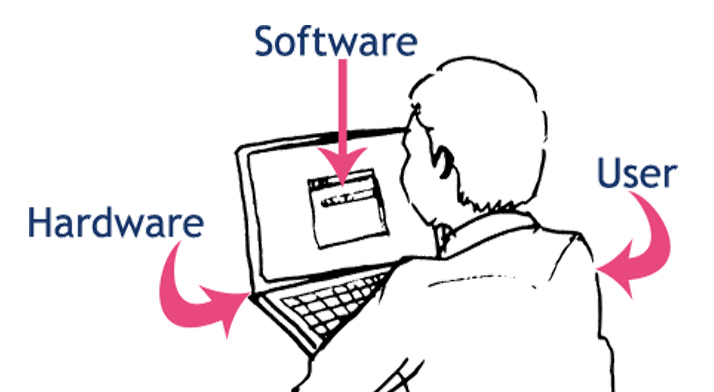
- यह User और Software के बीच interaction bridge होता है।
- इसमें Buttons, Forms, Menus, Icons, Colors, Fonts जैसे visual elements शामिल होते हैं।
- Good UI user को confuse नहीं करता और काम को fast व easy बनाता है।
- UI Design का main focus होता है : Usability, Simplicity और Consistency।
- Mobile Apps, Websites, ATM, IRCTC, Paytm जैसे systems में UI बहुत important होता है |
- Attractive और User-Friendly UI से user satisfaction बढ़ती है और productivity improve होती है।
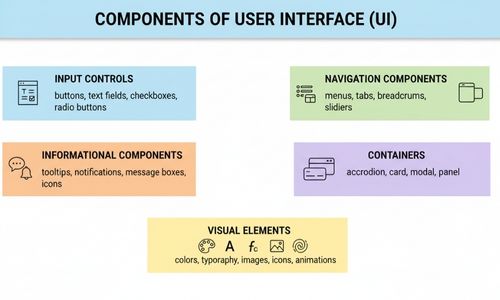
Components of User Interface
(यूज़र इंटरफेस के मुख्य घटक)
User Interface के वे सभी elements जिनसे user directly interact करता है, UI Components कहलाते हैं।
Types of User Interface (यूज़र इंटरफेस के प्रकार)
Type of UI | Description | Main Features | Interaction Method | Examples |
Command Line Interface (CLI) | Text-based interface जिसमें user keyboard से commands टाइप करके system को control करता है। | No graphics, command-oriented, direct system access | Keyboard commands | MS-DOS, Linux Terminal, Unix Shell |
Graphical User Interface (GUI) | Icons, windows, menus और mouse/touch के द्वारा interaction करने वाला interface। | Visual elements, point-and-click, user-friendly layout | Mouse, Keyboard, Touch | Windows, Android, iOS, Web Browsers |
Menu Driven Interface | User को options की list (menu) दी जाती है, जिनमें से वह selection करता है। | Predefined choices, step-by-step navigation | Keyboard, Mouse, Touch | ATM, Mobile Phone Menu, TV Remote Menu |
Form Based Interface | Data entry के लिए structured forms का उपयोग किया जाता है। | Text fields, labels, validation, submit buttons | Keyboard, Mouse, Touch | IRCTC Reservation Form, Online Registration Form |
Touch User Interface (TUI) | Screen को touch करके interaction किया जाता है। | Tap, Swipe, Pinch, Multi-touch gestures | Finger, Stylus | Smartphone, Tablet, Touch ATM |
Voice User Interface (VUI) | Voice commands से system operate किया जाता है। | Speech recognition, audio feedback | Human Voice | Alexa, Google Assistant, Siri |
Natural User Interface (NUI) | Gesture, face, body movement से interaction। | Sensors, camera, motion detection, AI | Hand Gestures, Face, Body Motion | Face Unlock, Motion Sensor Games, Smart TV |
Web User Interface | Internet browser के माध्यम से access किया जाने वाला interface। | Hyperlinks, web forms, multimedia content | Mouse, Keyboard, Touch | Websites, E-commerce Portals, Online Banking |
Mobile App Interface | Mobile devices के लिए specially designed interface। | Small screen layout, touch gestures, notifications | Touch, Voice | Paytm App, Flipkart App, WhatsApp |
Multimodal Interface | एक से अधिक interaction methods का combination। | Touch + Voice + Gesture support | Touch, Voice, Gesture | Smart Phones, Smart Cars, Smart Home Systems |
Principles of Good UI Design (यूज़र इंटरफेस डिज़ाइन के सिद्धांत)
एक अच्छा User Interface (UI) केवल attractive दिखने तक सीमित नहीं है। इसका main purpose है, user के लिए easy, fast और error-free interaction provide करना। UI design करते समय basic principles follow करना जरूरी है:
- Simplicity
- Interface simple और clutter-free होना चाहिए।
- Complex features को hide करें या step-wise दिखाएं।
- Example : IRCTC की ticket booking page में सिर्फ essential fields – “From”, “To”, “Date” – visible होते हैं।
- Consistency
- Same colors, fonts, buttons और design elements पूरे system में use हों।
- User familiar patterns को आसानी से पहचान सके।
- Example : Flipkart और Amazon में “Add to Cart” button हर page पर same position में होती है।
- Feedback
- हर user action पर system response देना चाहिए।
- Errors, warnings या success messages clearly दिखें।
- Example: Paytm में “Transaction Successful” या “Payment Failed” messages।
- Visibility
- Important options और controls easily visible हों।
- Hidden या confusing menus से बचें।
- Example : Mobile apps में main menu icon हमेशा top-left/top-right में रहता है।
- Error Prevention
- User mistakes को prevent करने के लिए validation और warning messages use करें।
- Example : Form filling में invalid email या mobile number डालने पर red error message।
- Flexibility & Efficiency
- Interface beginners और experts दोनों के लिए usable होना चाहिए।
- Experts के लिए keyboard shortcuts या advanced options provide करें।
- Example : Excel में basic users formulas use करते हैं, experts shortcuts से fast काम करते हैं।
- Aesthetic & Minimalist Design
- Interface attractive और readable होना चाहिए – सही fonts, colors और layout का use।
- Unnecessary elements को avoid करें ताकि interface clean और clutter-free रहे।
- Example : Google Search का homepage minimalist और simple है।
UI Design Process (यूज़र इंटरफेस डिज़ाइन की प्रक्रिया)
User Interface Design Process एक systematic तरीका है, जिससे software, website या app का interface user-friendly, attractive और effective बनाया जाता है। इसे step-by-step approach में follow किया जाता है।
Step 1: User Analysis
- Identify करना कि target users कौन हैं।
- Users की skills, preferences और limitations को समझना।
- Example : Banking app में age group, tech knowledge और accessibility requirements check करना।
Step 2: Task Analysis
- User क्या actions करेगा और कौनसे tasks perform करेगा, यह समझना।
- Example : IRCTC app में user search, select, book, और payment के steps follow करता है।
Step 3: Wireframing
- Rough sketches बनाना कि screen पर elements कहाँ होंगे।
- Layout, buttons, menus और navigation का initial structure तय करना।
- Tools : Balsamiq, Figma, Adobe XD
Step 4: Prototyping
- Clickable या interactive model बनाना।
- User flow और interactions check करने के लिए।
- Example : Mobile app prototype जो swipe, tap और navigation simulate करता है।
Step 5: Usability Testing
- Prototype को real users के साथ test करना।
- Feedback collect करके design में improvements करना।
- Example : Paytm app के नए feature को small user group में test करना।
Step 6: Visual Design & Implementation
- Final colors, fonts, icons, images और animations add करना।
- Design को actual software code में implement करना।
- Tools : Figma, Adobe XD, CSS, HTML, JavaScript
Step 7: Maintenance & Iteration
- User feedback के आधार पर improvements।
- Updates और new features के लिए UI adapt करना।
- Example : Flipkart app में new filter options या dark mode feature add करना।
Advantages of Good UI (लाभ)
- User-Friendly
- System को आसानी से समझा और use किया जा सकता है।
- Increased Productivity
- Users जल्दी और efficiently tasks complete कर पाते हैं।
- Reduced Errors
- Clear instructions और validation से mistakes कम होती हैं।
- Consistency
- Same layout और controls system-wide use होने से user familiar feel करता है।
- Better User Satisfaction
- Attractive और intuitive UI user को पसंद आता है।
- Easy Learning Curve
- नए users भी जल्दी system सीख सकते हैं।
- Improved Business Outcomes
- Effective UI users को attract करता है, जिससे revenue और retention बढ़ता है।
Disadvantages of Good UI (सीमाएँ)
- High Design Cost
- Professional UI design करने में समय और पैसा लगता है।
- Requires Skilled Designers
- UI design के लिए expert knowledge और creativity चाहिए।
- Time-Consuming
- Prototype और testing phases के कारण development लंबा हो सकता है।
- Hardware Dependency
- Advanced UI features (animations, high graphics) powerful hardware demand करते हैं।
- Maintenance
- Continuous user feedback और updates के लिए maintenance जरूरी है।
Difference Between UI and UX
| Aspect | UI (User Interface) | UX (User Experience) |
|---|---|---|
| Definition | System का visual और interactive part जिसे user देखता और interact करता है। | User का overall experience और satisfaction जब वह system use करता है। |
| Focus | Looks, colors, typography, buttons, layout, design elements। | Usability, functionality, efficiency, user satisfaction। |
| Goal | Attractive और user-friendly interface create करना। | Smooth और error-free experience provide करना। |
| Components | Buttons, menus, icons, forms, colors, typography। | Navigation flow, response time, ease of use, feedback, accessibility। |
| Example | Paytm homepage, IRCTC booking page, Flipkart product page। | Paytm recharge process simplicity, IRCTC ticket booking ease, Flipkart checkout flow। |
Conclusion (निष्कर्ष)
User Interface Design किसी भी software, website या application की सफलता में बहुत महत्वपूर्ण भूमिका निभाता है। एक अच्छा UI user और system के बीच strong connection बनाता है, जिससे user आसानी से tasks complete कर पाता है।
Simplicity, Consistency, Feedback और Usability जैसे principles follow करके बनाया गया UI न केवल attractive होता है, बल्कि error-free और efficient भी होता है।
आज के digital era में Mobile Apps, Websites, Banking Systems और E-commerce platforms के लिए user-friendly UI design करना business growth, user satisfaction और productivity बढ़ाने के लिए जरूरी है। इसलिए, UI Design को केवल looks तक सीमित न समझकर overall system usability का core हिस्सा माना जाना चाहिए।
Important Questions (महत्वपूर्ण प्रश्न)
Q. 1: User Interface Design क्या है? इसके मुख्य उद्देश्य और महत्व समझाइए।
User Interface Design वह प्रक्रिया है, जिसमें software, website या application के screen layout, buttons, icons, menus, colors और controls को इस तरह design किया जाता है कि user system को आसानी से समझ सके और उससे interact कर सके।
मुख्य उद्देश्य एवं महत्व:
User और software के बीच interaction को आसान बनाना
System का attractive और user-friendly look बनाना
User confusion और errors को कम करना
Work को fast, easy और efficient बनाना
User satisfaction और productivity को बढ़ाना
Q. 2: User Interface के विभिन्न प्रकार (Types of UI) को उदाहरण सहित समझाइए।
User Interface के प्रमुख प्रकार निम्नलिखित हैं :
Command Line Interface (CLI)
Text-based interface जहाँ commands type की जाती हैं।
Example : MS-DOS, Linux Terminal
Graphical User Interface (GUI)
Icons, windows, menus और mouse/touch का उपयोग।
Example : Windows, Android, iOS
Menu Driven Interface
Options की list दी जाती है, user selection करता है।
Example : ATM menu, TV remote menu
Form Based Interface
Data entry के लिए structured forms।
Example : IRCTC reservation form
Touch User Interface (TUI)
Touch gestures से interaction।
Example : Smartphone, Tablet
Voice User Interface (VUI)
Voice commands से system operate होता है।
Example : Alexa, Google Assistant
Q. 3: Good UI Design के सिद्धांत (Principles of UI Design) कौन-कौन से हैं? किसी तीन को उदाहरण सहित समझाइए।
Good UI Design के मुख्य सिद्धांत निम्नलिखित हैं :
Simplicity
Interface simple और clutter-free होना चाहिए।
Example : IRCTC booking page पर केवल जरूरी fields दिखना
Consistency
Same colors, fonts और buttons पूरे system में use होना।
Example : Flipkart में “Add to Cart” button हर page पर same जगह
Feedback
User action पर system response देना।
Example : Paytm में “Transaction Successful” message
अन्य सिद्धांत: Visibility, Error Prevention, Flexibility, Aesthetic Design।
Q. 4: User Interface Design Process के चरणों को क्रमवार समझाइए।
User Interface Design Process एक step-by-step approach है :
User Analysis – Target users की पहचान और जरूरतें समझना
Task Analysis – User कौन-कौन से tasks करेगा, यह समझना
Wireframing – Screen layout का rough sketch बनाना
Prototyping – Clickable या interactive model बनाना
Usability Testing – Real users से testing और feedback लेना
Visual Design & Implementation – Colors, fonts add करके final design बनाना
Maintenance & Iteration – Feedback के आधार पर improvements
Q. 5 : UI और UX में अंतर स्पष्ट कीजिए।
| Aspect | UI (User Interface) | UX (User Experience) |
|---|---|---|
| Definition | System का visual और interactive part | User का overall experience |
| Focus | Colors, buttons, layout, fonts | Usability, ease, satisfaction |
| Goal | Attractive interface बनाना | Smooth और error-free experience देना |
| Components | Icons, menus, forms | Navigation flow, feedback |
| Example | Paytm homepage design | Paytm recharge process simplicity |