
ALU (ALU क्या है?)
ALU का full form है, Arithmetic Logic Unit। यह CPU (Central Processing Unit) का वह मुख्य हिस्सा है जो सभी arithmetic और logical operations को perform करता है। यह CPU का “computation engine” कहलाता है क्योंकि यही addition, subtraction, AND, OR, comparison और decision-making operations करता है।
Table of Contents
ToggleKey Points
- ALU के अंदर Registers और Accumulator होते हैं।
- ये intermediate results और input data को temporarily store करते हैं।
- बिना registers के calculation slow या complex हो सकता है।
- ALU self decide नहीं करता कि कौन सा operation करना है।
- Control Unit (CU) के instructions के अनुसार काम करता है।
- CU और ALU मिलकर CPU के operations को manage करते हैं।
Main Functions of ALU (ALU के मुख्य कार्य)
ALU के मुख्य कार्य तीन categories में divide किए जा सकते हैं :
- Arithmetic Operations : ALU संख्याओं के साथ basic गणितीय operations perform करता है:
- Addition (जोड़ना) – जैसे 5 + 3 = 8
- Subtraction (घटाना) – जैसे 10 – 4 = 6
- Multiplication (गुणा) – जैसे 6 × 7 = 42
- Division (भाग) – जैसे 20 ÷ 4 = 5
- Increment / Decrement – 1 जोड़ना या घटाना
- Logic Operations : ALU केवल numbers की calculation नहीं करता, बल्कि logic decisions भी लेता है।
- AND – दोनों inputs true होने पर output true
- OR – कोई भी input true होने पर output true
- NOT – input का inverse
- XOR – केवल तब true जब inputs अलग हों
- NAND / NOR – AND/OR का complement
- Comparison & Decision Making : ALU दो values की तुलना करके decision-making भी करता है।
- Greater than (>) – 20>10⇒True
- Less than (<) – 20>10⇒True
- Equal to (=) – 15=15⇒True
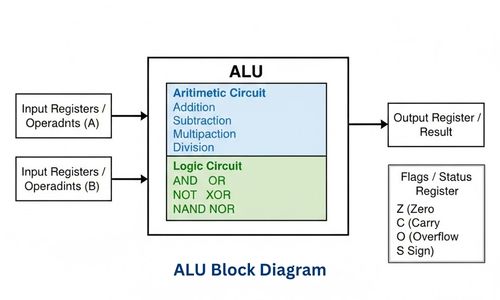
ALU Structure (संरचना)
1. Input Registers
- CPU या Memory से आने वाले operands (data values) को temporary store करते हैं।
2. Control Lines
- Control Unit से signals ALU को भेजती हैं, कि कौनसा operation perform करना है।
3. Arithmetic Circuit
- यह वह circuitry है, जो Addition, Subtraction, Multiplication और Division operations perform करती है।
- Most ALUs में Adder, Subtractor, Increment/Decrement Units होते हैं।
4. Logic Circuit
- यह circuit AND, OR, NOT, XOR, NAND, NOR जैसे logic operations handle करता है।
5. Output Register
- ALU द्वारा निकाला गया result यहाँ temporary store होता है।
- CPU आगे इसे Memory में write या next instruction में use करता है।
6. Flags / Status Register
- ALU operations के result के बारे में status information रखता है।
- Important Flags :
- Z (Zero Flag) : Result = 0
- C (Carry Flag) : Carry generate हुआ है
- O (Overflow Flag) : Result overflow हुआ है
- S (Sign Flag) : Positive / Negative
ALU Working – Step by Step Process
Step1: Instruction Fetch
- CPU सबसे पहले Memory से instruction fetch करता है।
- Example instruction : ADD A, B
Step2: Instruction Decode
- Control Unit (CU) instruction को decode करती है।
- CU यह identify करती है :
- कौन-सा operation करना है (ADD / SUB / AND आदि)
- कितने operands हैं (A, B)
Step3: Data Transfer to ALU
- Operands (A और B) को Input Registers में भेजा जाता है।
- Example (Math form) :
Step4: Operation Execution
- Control Unit ALU को control signals भेजती है।
- Arithmetic Circuit → Addition, Subtraction, Multiplication करता है
- Logic Circuit → AND, OR, NOT, XOR जैसे logical operations करता है
- Example (Arithmetic) : 12 + 7 =19
- Example (Logic) : 1010 AND 1100 = 1000
Step5: Result Generation
- ALU calculation complete करने के बाद result Output Register में store करता है।
- साथ ही Flags (Status Bits) update होते हैं :
- Carry Flag
- Zero Flag
- Overflow Flag
- Sign Flag
Step6: Result Storage / Next Instruction
- Result को Memory में store किया जाता है, या अगले instruction में use किया जाता है।
Advantages of ALU (ALU के लाभ)
- Fast Processing Speed : ALU arithmetic और logical operations को बहुत तेजी से perform करता है।.
- Accurate Results : ALU binary logic पर based होता है, इसलिए calculations में error की possibility बहुत कम होती है।
- Supports Decision Making : Logical operations (AND, OR, NOT) की मदद से ALU Computer को decision लेने योग्य बनाता है।
- Essential for All Applications : Simple calculator से लेकर AI, Machine Learning, Space Research तक हर system में ALU जरूरी है।
- Improves Overall CPU Performance : ALU CPU का core part है, इसलिए इसकी efficiency से पूरे system की performance बढ़ जाती है।
- Supports Automation : Automatic systems जैसे ATM, Traffic Control, Industrial Machines—ALU के बिना possible नहीं हैं।
Limitations of ALU (ALU की सीमाएँ)
- Works Only on Binary Data : ALU केवल 0 और 1 (Binary System) पर काम करता है।
Cannot Store Data Permanently : ALU खुद data को store नहीं कर सकता, Data storage के लिए यह Registers और Memory Unit पर depend करता है। - Depends on Control Unit (CU) : ALU अपने आप decide नहीं कर सकता कि कौन सा operation करना है। Control Unit के instructions पर पूरी तरह dependent होता है।
- Limited Operation Set : ALU केवल predefined arithmetic और logical operations ही perform करता है। Complex tasks के लिए multiple instructions की जरूरत होती है।
- No Direct Interaction with Input/Output Devices : ALU सीधे keyboard, mouse या printer से interact नहीं करता। I/O operations CPU के दूसरे parts handle करते हैं।
I/O System Bus
I/O System Bus Computer Architecture का एक communication system है, जो CPU (Central Processing Unit), Main Memory, और Input/Output Devices (जैसे Keyboard, Mouse, Printer, Hard Disk, Scanner आदि) के बीच data, address और control signals को transfer करने का काम करता है।
यह bus सुनिश्चित करती है, कि CPU और external devices आपस में efficiently और coordinated तरीके से communicate कर सकें।
Key Points
- I/O System Bus CPU और I/O devices के बीच interface का काम करता है।
- यह speed mismatch को handle करता है, क्योंकि CPU बहुत fast होता है जबकि I/O devices relatively slow होते हैं।
- यह multiple I/O devices को simultaneously manage करने में मदद करता है।
- System की overall performance और efficiency को improve करता है।
- I/O System Bus की मदद से Interrupt और DMA (Direct Memory Access) जैसे advanced techniques possible होती हैं।
- Modern computers में PCIe, USB जैसे high-speed I/O buses का use किया जाता है।
Need of I/O System Bus (I/O Bus की आवश्यकता क्यों?)
- To handle speed mismatch
- CPU बहुत fast होता है, जबकि I/O Devices जैसे Keyboard, Mouse, Printer comparatively slow होते हैं।
- I/O System Bus CPU और devices के बीच speed difference को efficiently manage करता है।
- For communication between the CPU and I/O devices
- CPU सीधे सभी I/O devices से efficient तरीके से communicate नहीं कर सकता।
- I/O Bus एक common communication path provide करता है।
- To manage multiple I/O devices
- Computer system में कई I/O devices connected होते हैं।
- I/O Bus सभी devices के data transfer और control को properly organize करता है।
- To reduce CPU load
- Interrupt Driven I/O और DMA (Direct Memory Access) की मदद से CPU unnecessary busy नहीं रहता।
- इससे CPU अन्य important tasks perform कर पाता है।
- For transferring Data, Address, and Control Signals
- I/O System Bus के बिना Data, Address, Control signals सही device तक पहुँचाना possible नहीं होता।
- To improve System Performance
- Well-designed I/O Bus data transfer को fast, smooth और efficient बनाता है, जिससे overall system performance बढ़ती है।
- For expandability
- I/O Bus की मदद से new devices जैसे USB devices, Printer, Scanner, External Hard Disk easily add किए जा सकते हैं।
- For Reliable and Controlled I/O Operations
- I/O Bus Read/Write operations, Device status checking, Error handling को reliable और controlled बनाता है।
Components of I/O System Bus
(I/O System Bus के घटक)
1. Data Bus : Data Bus का काम actual data को transfer करना होता है।
- CPU, I/O Devices के बीच real data ले जाने का काम करता है
- Bidirectional होता है (data दोनों direction में जा सकता है)
- Data Bus की width (8-bit, 16-bit, 32-bit, 64-bit) system performance को affect करती है
2. Address Bus : Address Bus यह बताता है कि data किस device या किस location पर भेजा जाना है।
- Mostly Unidirectional होता है)
- CPU address भेजता है जिससे सही I/O device select हो सके
- Device selection और memory mapping में important role निभाता है
3. Control Bus : Control Bus data transfer को control और coordinate करता है।
- Read / Write signals भेजता है
- Interrupt signals carry करता है
- I/O device की status information (Ready, Busy, Error) provide करता है
I/O Bus Architecture Models
1. Single Bus Architecture Model
- Single Bus Architecture में एक ही common bus CPU, Main Memory और सभी I/O Devices द्वारा share की जाती है।
- Data, address और control signals के लिए सिर्फ one communication path होता है।
- Structure : CPU ↔ Main Memory ↔ I/O Devices
Working:
- CPU जब memory access करता है, bus busy हो जाती है
- उसी समय कोई I/O device bus use नहीं कर सकता
- Operations sequential होते हैं
2. Dual Bus Architecture Model
- Dual Bus Architecture Computer Architecture में एक ऐसा model है जिसमें दो अलग–अलग buses होती हैं:
- Memory Bus – CPU और Main Memory के बीच communication के लिए
- I/O Bus – CPU और I/O devices के बीच communication के लिए
- इस model का मुख्य उद्देश्य performance को improve करना और bus congestion को कम करना है।
Working :
- CPU memory से instruction fetch करता है
- उसी समय I/O device data transfer कर सकता है
- Bus conflict कम हो जाता है
3. Multiple Bus Architecture Model
- Multiple Bus Architecture High-Performance Computer Systems में use होने वाला एक advanced I/O Bus model है। इसमें दो से ज्यादा buses होती हैं और हर bus का अपना specific role होता है।
- यह model specially high-speed devices और low-speed devices को efficiently manage करने के लिए design किया गया है।
Working :
- High-speed devices (Graphics Card, SSD) high-speed bus use करते हैं
- Low-speed devices (Keyboard, Mouse) slow bus use करते हैं
- Parallel data transfer possible होता है
I/O Bus Operations
- Programmed I/O (Polling Method)
- CPU directly control करता है I/O operation को।
- CPU continuously device को check करता है, कि ready है या नहीं।
- यह process polling कहलाती है।
- Interrupt Driven I/O
- Device अपनी तरफ से CPU को interrupt signal भेजता है जब data ready होता है।
- CPU free रहता है और other tasks perform करता है।
- Direct Memory Access (DMA)
- Data transfer बिना CPU intervention के directly I/O device ↔ Memory होता है।
- CPU केवल transfer start और end control करता है।
Advantages (लाभ)
- Efficient Data Transfer : Data Bus, Address Bus और Control Bus के माध्यम से CPU और I/O devices के बीच fast और accurate communication possible होता है।
- Device Compatibility : Multiple I/O devices को single bus के जरिए connect किया जा सकता है।
- Reduced CPU Load : DMA और Interrupt Driven I/O की मदद से CPU free रहता है।
- Expandability / Scalability : नई I/O devices आसानी से add की जा सकती हैं।
- Controlled Operations : Control Bus के जरिए Read/Write और device status को manage किया जाता है।
- Supports Parallel Processing : Dual Bus और Multiple Bus architectures में simultaneous data transfer possible है।
Limitations (सीमाएँ)
- Speed Limitation : Shared bus systems में multiple devices एक ही bus share करते हैं, जिससे data transfer slow हो सकता है।
- Bus Contention : Multiple devices simultaneously bus use करना चाहते हैं तो conflict हो सकता है।
- Hardware Dependency : Bus width, connectors और controller hardware की design पर निर्भर करता है।
- Design Complexity : Dual और Multiple Bus architectures में design और maintenance complex होती है।
- Cost Factor : More buses और advanced bus controllers system cost बढ़ा देते हैं।
Conclusion (निष्कर्ष)
ALU (Arithmetic Logic Unit) CPU का core part है, जो सभी arithmetic और logical operations perform करता है। यह fast processing, accurate calculation, और decision-making के लिए जरूरी है। ALU बिना Control Unit (CU) के खुद निर्णय नहीं ले सकता और केवल binary data पर काम करता है। Modern computers में ALU की efficiency CPU की overall performance को directly affect करती है।
I/O System Bus CPU, Memory और I/O devices के बीच smooth communication सुनिश्चित करता है। यह speed mismatch, multiple device management, और data transfer coordination में मदद करता है। Advanced techniques जैसे DMA और Interrupt Driven I/O I/O Bus के बिना efficiently possible नहीं हैं। Dual और Multiple Bus Architectures modern high-performance systems में parallel data transfer और bus congestion reduction के लिए use होते हैं।
अक्सर पूछे जाने वाले प्रश्न (Important FAQ) – ALU & I/O System Bus
Q1. ALU का full form क्या है?
- Arithmetic Logic Unit, CPU का वह part जो सभी arithmetic और logical operations perform करता है।
Q2. ALU किन operations को perform करता है?
- Arithmetic : Addition, Subtraction, Multiplication, Division, Increment/Decrement
- Logic : AND, OR, NOT, XOR, NAND, NOR
- Comparison & Decision Making: Greater than (>), Less than (<), Equal to (=)
Q3. ALU और Control Unit में अंतर क्या है?
- ALU operations perform करता है, CU बताता है, कि कौन सा operation कब और कैसे करना है। ALU CU के instructions पर depend करता है।
Q4. I/O System Bus क्या है?
- यह CPU, Memory और I/O devices के बीच data, address और control signals transfer करने का communication system है।
Q5. I/O Bus के मुख्य components कौनसे हैं?
- Data Bus : Actual data transfer (Bidirectional)
- Address Bus : Data कहाँ भेजा जाएगा (Mostly Unidirectional)
- Control Bus : Read/Write और device status control
Q6. I/O Bus की मुख्य आवश्यकता क्यों है?
- CPU और I/O devices के बीच speed mismatch manage करने के लिए
- Multiple devices को efficiently handle करने के लिए
- Data transfer और device coordination सुनिश्चित करने के लिए
Q7. I/O Bus के मुख्य types कौनसे हैं?
- Single Bus Architecture : Simple, sequential operations
- Dual Bus Architecture : Separate buses for Memory & I/O, better performance
- Multiple Bus Architecture : Parallel data transfer for high-performance systems